
When Headless Shopify Will Make Sense For Your Online Store (And When It Won’t)
Written and edited by: Eric
Hey everyone! Hope you’re all at least starting to thaw?
Eric Boisjoli here again from Bold Match, and today I’d like to talk about headless commerce. Specifically, whether your Shopify store actually needs it or whether you’re about to spend six figures solving a problem you don’t really have. I’ve been building e-commerce infrastructure for long enough now to have watched “headless” go from obscure web dev forum terminology to the kind of buzzword getting thrown around in every development agency pitch deck. Which is fine, except that the hype has gotten way ahead of the practical reality for most merchants. So let’s cut through it. I’m gonna explain what headless actually means, what it really is good for, then try to help you figure out whether your store’s a candidate, or whether you’d be better off investing your dollars somewhere else.
What Headless Commerce Actually Means
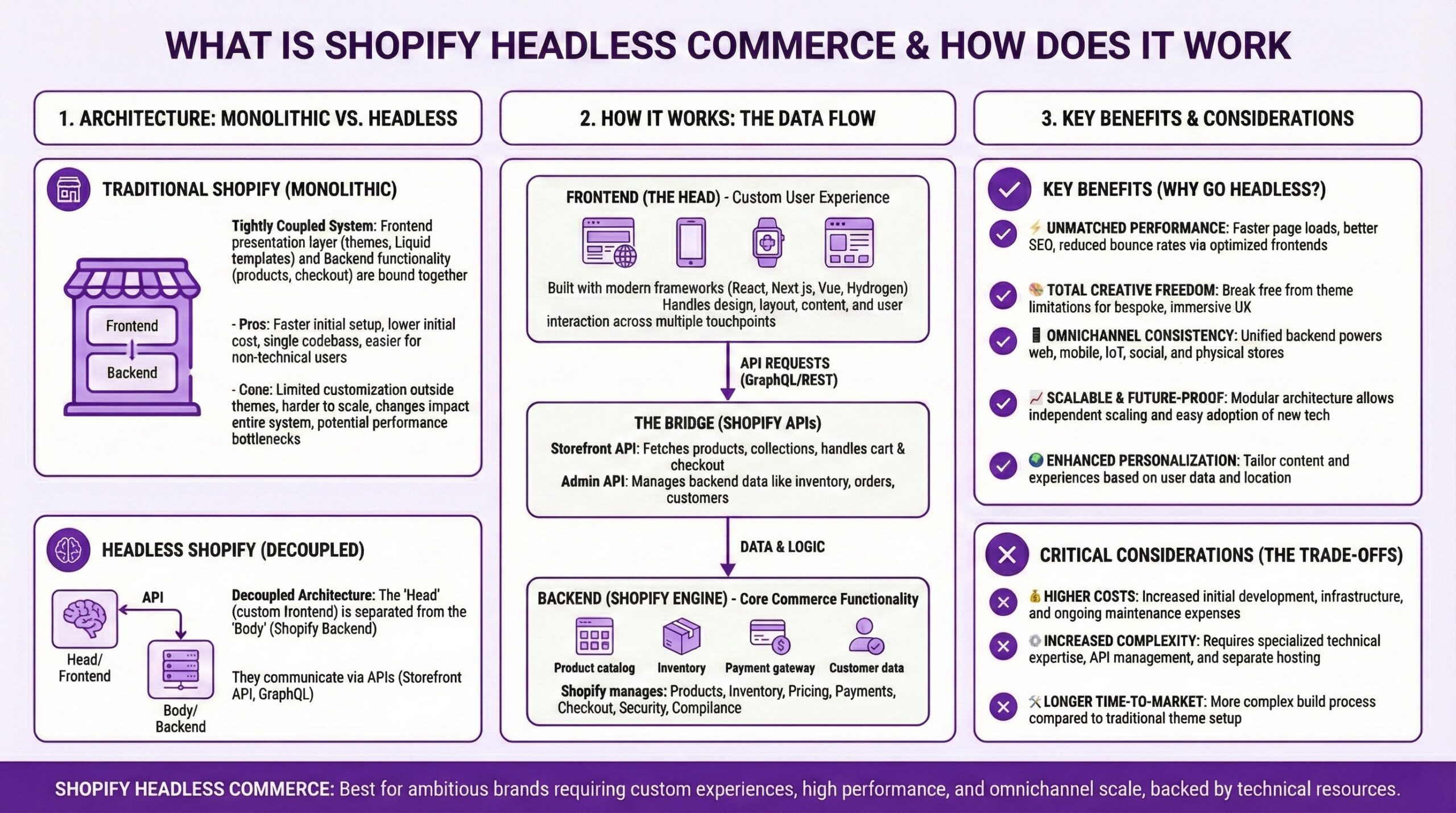
Picture your current Shopify store as a complete package. The storefront consumers see (the “head”) and the commerce engine running everything behind the scenes (inventory, orders, payments) are connected as one integrated system. And both pieces work together seamlessly. Going headless means you’re removing that front-end storefront and replacing it with something custom-built. Your store’s “head” becomes a separate application, usually built in React or a similar JavaScript framework, that talks to Shopify’s backend through APIs. It’s not unlike buying a bespoke deck for your old trucks, wheels, bearings, grip tape, and mounting hardware
The appeal has a lot to do with the creative freedom it offers. I mean. Instead of working within Shopify’s Liquid templating system, your web devs can build literally anything. Complex product configurators. Immersive 3D experiences. Multi-step quizzes that feel like native apps. If you can code it, you can ship it. But agency pitches often gloss over the whole thing where that freedom comes with real tradeoffs in cost, complexity and ongoing maintenance. And for plenty of growing retailers, those tradeoffs just don’t make sense.
The Performance Myth That Won’t Die
One of the most persistent arguments for headless is speed. You’ve probably heard some version of “headless stores are faster” repeated as if it were gospel. The data tells a different story. Shopify’s own performance analysis found that 59.5% of standard Liquid storefronts pass all Core Web Vitals thresholds. That number has continued climbing. Even more interesting, Liquid actually outperforms most server-side rendering frameworks that power typical headless implementations. Of all the common headless e-commerce frameworks, only Hydrogen (Shopify’s own headless solution) comes close to matching Liquid’s performance. And that gap got more noticeable when Google replaced First Input Delay with Interaction to Next Paint (INP) as a Core Web Vital back in ‘24.
What does this mean for your Shopify store? Well. It means that if someone tells you that headless will automatically make your store site faster, they’re either misinformed or oversimplifying. Read that again. A well-optimized Liquid theme will usually outperform a poorly implemented headless build. And “poorly implemented” headless builds are more common than you’d think, because headless requires your development team to handle caching, rendering optimization, and infrastructure that Shopify normally manages for you.
Can headless be faster? Absolutely. With full-page caching, edge deployment through Shopify’s Oxygen hosting, and meticulous sub-request caching configuration, a Hydrogen build can deliver sub-second page loads consistently. But that requires developers who know what they’re doing and ongoing attention to performance budgets. In other words. It’s achievable, not automatic.
What Headless Is Actually Good For
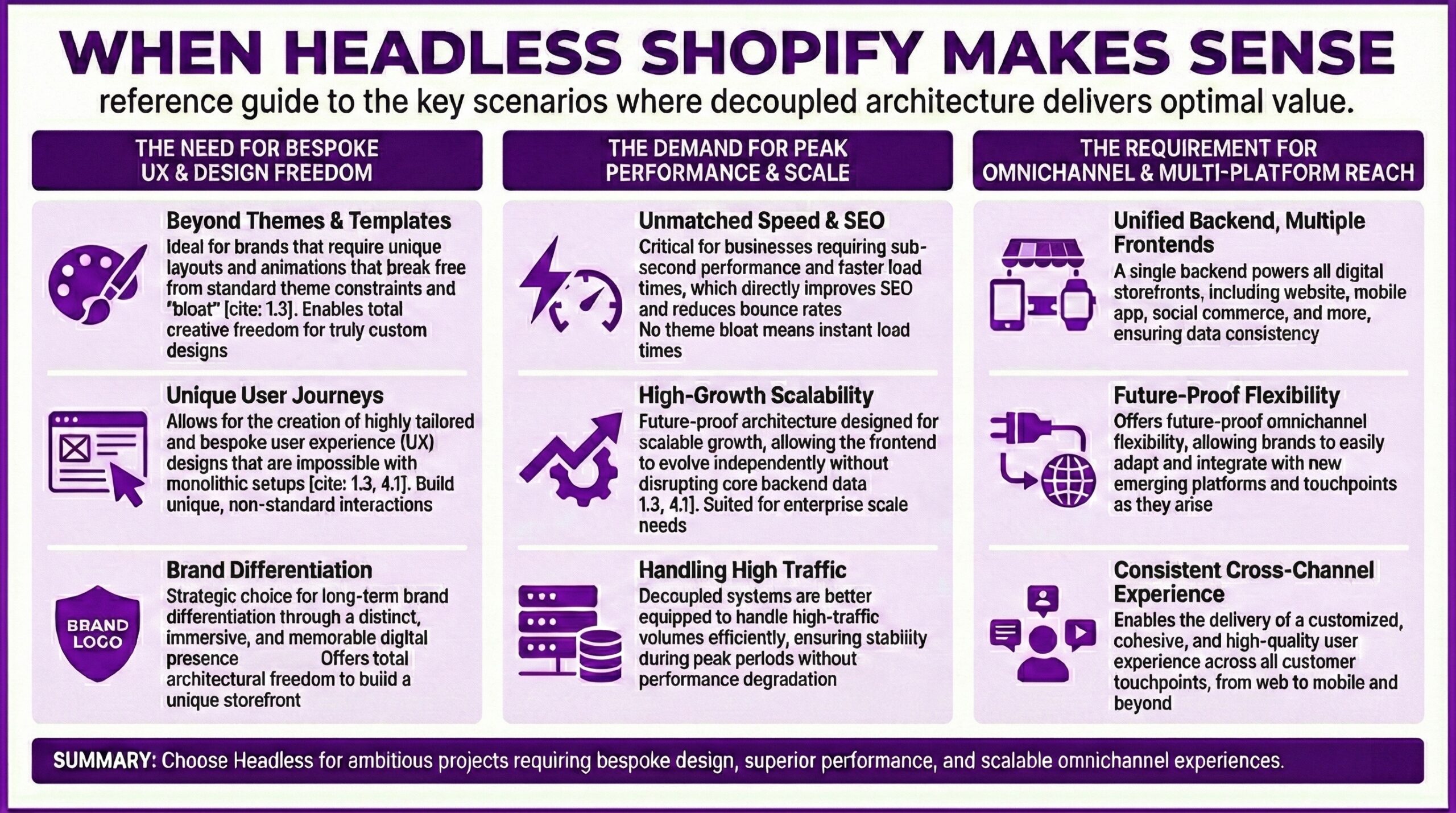
So if performance isn’t the stuff shot argument, why do brands go headless? There are three categories of legitimate reasons.
Complex Frontend Requirements: Some shopping experiences simply can’t be built within Liquid’s constraints. ILIA Beauty moved to a headless architecture to achieve faster local development and git-based deployment workflows that their team couldn’t accomplish with traditional themes. Barefoot Dreams needed complex product quizzes, personalization engines, and multi-step product configurators that would have been extremely challenging in Liquid.
If your product requires a truly custom frontend experience (think 3D configurators, AR try-on features, or interactive lookbooks), headless gives you the canvas to build it.
Content-Heavy Marketing Operations: Some brands run their sites more like media companies than traditional retailers. They need sophisticated content management with approval workflows, scheduled publishing, granular team permissions, and tight integration with external content systems.
Headless lets you integrate powerful headless CMS platforms like Sanity, Contentful, or Storyblok. Your marketing team gets tools designed specifically for content creation while your commerce operations stay on Shopify. Bols Spirits, for example, uses Storyblok with Shopify so their marketing team can create and ship content-rich campaigns without needing developer involvement for every update.
True Omnichannel Requirements: If you’re selling across multiple touchpoints (web, mobile app, in-store kiosks, voice commerce), headless architecture lets you manage content from a single backend and deliver it to any interface. You write your commerce logic once, then surface it wherever your customers are. Merchants often find this particularly valuable when expanding internationally. Building region-specific frontend experiences while maintaining a unified backend becomes much more manageable with decoupled architecture.
How Much Will Going Headless with Shopify Cost
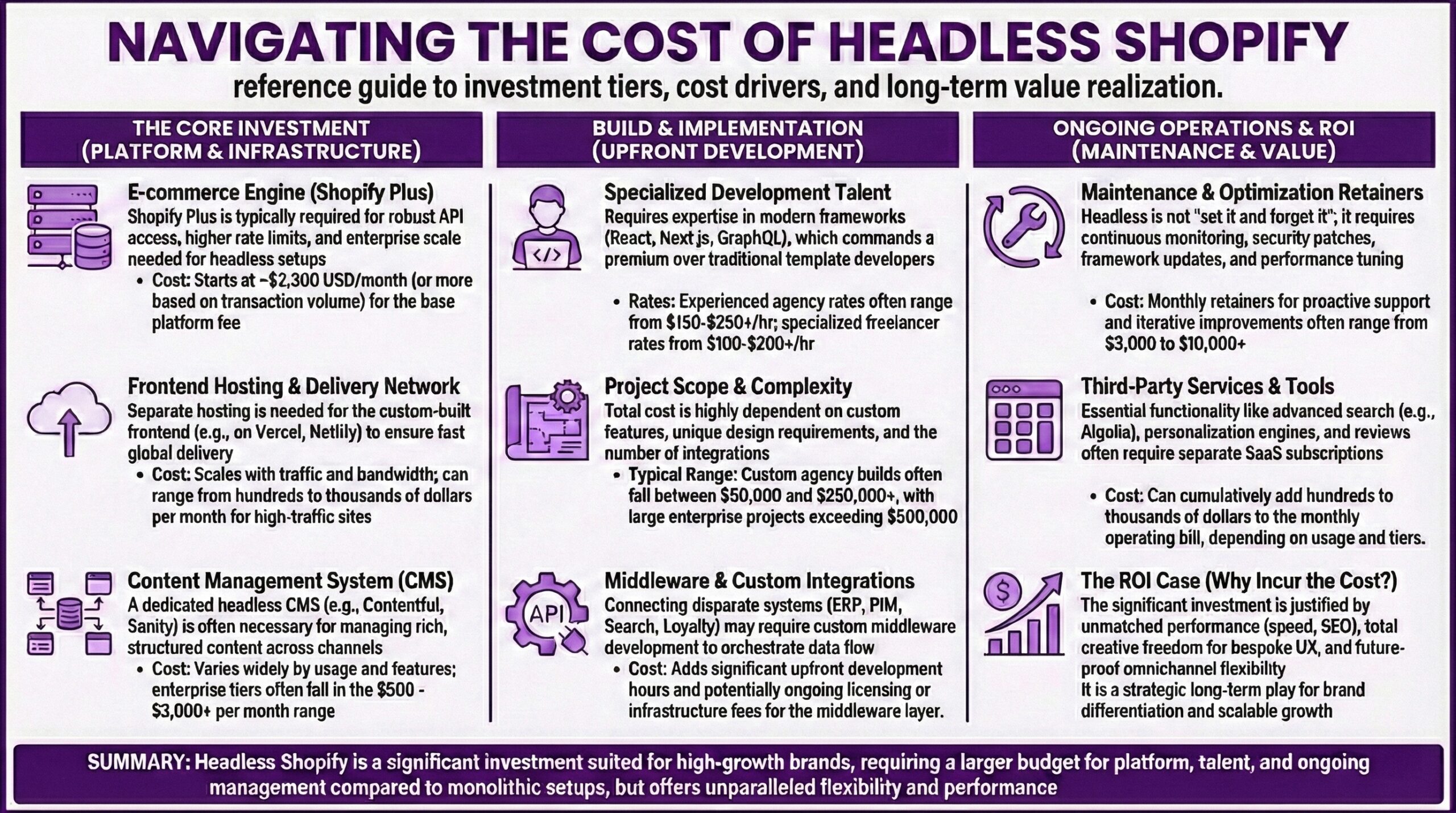
Now. Let’s talk money, because this is where a lot of merchants underestimate what they’re signing up for. Headless implementations usually cost $20,000 to $100,000+ depending on complexity. Compare that to $2,000 to $10,000 for a custom Liquid theme. For mid-market businesses, initial implementation commonly runs $50,000 to $150,000, while enterprise builds can exceed $250,000.
But the upfront build is only part of the picture. Ongoing maintenance costs are significantly higher because you’re now responsible for infrastructure that Shopify would otherwise handle. You’ll need developers who understand React (or your chosen framework), caching strategies, edge deployment, and API optimization. That’s a different skillset than traditional Shopify theme development.
You’ll also likely need additional services. A headless CMS typically runs anywhere from free (with significant limitations) to $1,000+ monthly for robust enterprise features. Some businesses need custom middleware to handle complex business logic between their frontend and Shopify’s backend. Analytics and marketing tools need to be re-integrated. Each of these adds complexity and cost.
The timeline matters too. Headless builds take longer. If your business needs to launch quickly or adapt to market changes rapidly, consider whether you can afford the extended development cycle. A well-executed headless implementation can take six to twelve months, compared to weeks or a couple months for theme-based builds.
When Standard Liquid Themes Beat Headless
Here’s something the headless evangelists rarely mention. For most e-commerce use cases, Shopify’s Online Store 2.0 themes are genuinely excellent. And they’ve gotten dramatically more flexible over the past few years. If your primary needs are straightforward product display, basic filtering, standard checkout flows, and solid mobile performance, Liquid themes deliver all of that with significantly less complexity. Large enterprise retailers like Rothy’s, Rad Power Bikes, and Dollar Shave Club run on Liquid storefronts and still hit performance benchmarks.
The operational advantages are substantial. Theme updates happen automatically. App integrations usually work out of the box. Your team can make content changes through Shopify’s admin without developer involvement. If someone on your marketing team wants to update a banner or rearrange homepage sections, they can do it themselves. With headless, you often need a developer for changes that would be trivial in a standard theme setup. That creates bottlenecks and slows your team down.

The Right Questions to Ask About Headless
Before you commit to headless, honestly assess these questions.
Does your current platform’s performance directly limit revenue? If your store loads reasonably fast and customers aren’t abandoning due to performance issues, headless won’t magically improve conversions.
Do you need features that Liquid themes genuinely can’t provide? Not “would be difficult” but actually impossible. Complex product configurators, AR experiences, and deeply integrated content systems qualify. A fancier homepage design doesn’t.
Does your team have the resources to maintain custom frontend infrastructure? This means either in-house React developers or an ongoing agency relationship. If you’re planning to build headless and then hand it off to a general Shopify freelancer, you’re going to have a bad time.
Do the benefits justify the increased complexity and cost? For brands doing $1M+ GMV with unique UX requirements, headless often pays off within six to twelve months through higher conversion rates. For growing stores still finding product-market fit, that money might be better spent on inventory, marketing, or customer acquisition.
If you don’t answer yes to at least one of the first three questions, standard Shopify likely delivers better ROI.
If You Do Decide to Go With Headless
Let’s just assuming headless makes sense for your situation, here’s what the smart approach looks like.
Start with Hydrogen. Shopify’s own headless framework gives you the best chance of matching Liquid’s performance. It’s built specifically for Shopify’s Storefront API with optimized components and patterns. You can deploy on Oxygen (Shopify’s hosting platform) for free, which simplifies infrastructure significantly.
Don’t underestimate the migration. Moving from a Liquid theme to headless isn’t a simple upgrade. SEO redirects need careful handling. Analytics configurations need rebuilding. Third-party integrations may need custom work. Budget time and resources accordingly.
Work with specialists. This isn’t a project for generalist developers or agencies that “do a bit of everything.” Headless Shopify implementations require specific expertise in React, API architecture, and Shopify’s ecosystem. The right partner understands the tradeoffs and can tell you honestly whether headless is right for your situation.
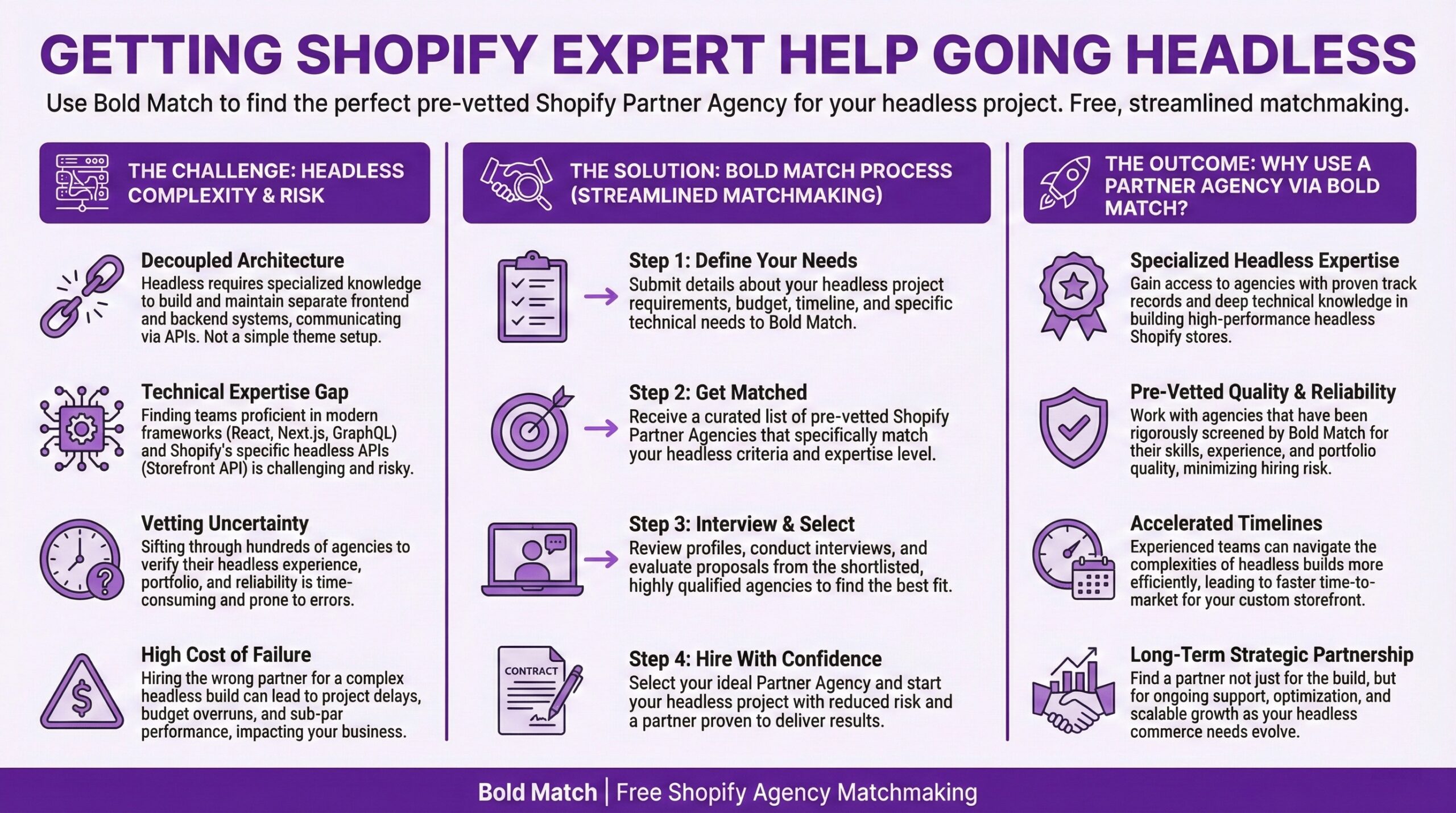
Getting Expert Help Going Headless
Headless Shopify isn’t a default upgrade path. It’s a strategic choice that makes sense when your frontend requirements exceed what Liquid themes can deliver, when you need tight integration with visual CMS tools for content marketing, when your team has the resources to maintain custom frontend infrastructure, and when the benefits genuinely justify the increased complexity and cost.
For many merchants, well-optimized Liquid themes deliver better performance with significantly lower complexity. And that’s not settling for less. That’s making a smart business decision based on what your store actually needs. The key is being honest about your actual requirements versus the theoretical benefits of “modern” architecture. If headless solves a real problem you’re experiencing today, pursue it with eyes open. If you’re chasing it because it sounds cutting-edge, you might be better served putting that budget toward marketing, product development, or customer experience improvements that move the needle immediately.
Need help thinking through whether headless is right for you? Bold Match can connect you with Shopify Agencies who specialize in exactly these kinds of decisions. We’ll match you with a partner who can assess your specific situation and recommend the approach that actually makes sense for your business, not the one that generates the biggest project fee. Alright, I’ve got to run and refactor some edge caching middleware that’s been giving us grief in staging. So go make your tech stack work smarter, not harder! — Eric B
Should You Have a Headless Shopify Store?
|
Factor |
Standard Liquid Theme |
Headless (Hydrogen) |
|
Initial Build Cost |
$2,000 – $10,000 for custom theme |
$20,000 – $100,000+ depending on complexity |
|
Timeline to Launch |
2-8 weeks |
3-12 months |
|
Ongoing Maintenance |
Low. Shopify handles infrastructure. Theme updates usually automatic. |
High. You manage hosting, caching, CDNs, deployment pipelines, and CMS. |
|
Developer Requirements |
Liquid/Shopify theme expertise. Widely available. |
React/Next.js plus API architecture. Specialized skillset, higher rates. |
|
Core Web Vitals Performance |
59.5% pass rate out of the box. Optimized by Shopify. |
Can match or exceed Liquid with proper optimization. Requires expertise. |
|
Design Flexibility |
Good. Online Store 2.0 offers significant customization within Liquid constraints. |
Unlimited. Build anything you can code. 3D configurators, AR, interactive experiences. |
|
Content Management |
Shopify admin plus metafields. Marketing team can edit directly. |
Integrate headless CMS (Sanity, Contentful, Storyblok). Powerful but adds complexity. |
|
App Ecosystem |
Full access to Shopify App Store. Most apps work immediately. |
Limited. Frontend apps need custom integration. Backend apps still work. |
|
Marketing Team Independence |
High. Theme editor lets non-devs make changes easily. |
Variable. Depends on CMS choice and implementation. Often needs developer involvement. |
|
Omnichannel Capability |
Web only. Mobile app requires separate build. |
Excellent. Single backend serves web, mobile app, kiosks, IoT, and more. |
|
International Expansion |
Shopify Markets handles multi-currency and localization well. |
More flexibility for region-specific frontends while unified backend manages inventory. |
|
Best For |
Most growing merchants. Standard e-commerce needs. Teams wanting speed and simplicity. |
Brands with complex UX requirements. Content-heavy operations. True omnichannel needs. $1M+ GMV with dev resources. |
Frequently Asked Questions (FAQ)
What is headless and how does it differ from a standard Shopify store?Headless Shopify separates the frontend (what shoppers see) from the backend (commerce engine handling inventory, orders, and payments). In a standard Shopify store, both are integrated as one system using Liquid templates. With headless, you build a custom frontend using frameworks like React while Shopify’s backend handles all commerce operations through APIs. This gives developers complete creative freedom but requires more technical expertise and investment.
Is a headless Shopify store faster than a regular Shopify store?
Not automatically. Shopify’s performance data shows that 59.5% of standard Liquid storefronts pass all Core Web Vitals, and Liquid actually outperforms most server-side rendering frameworks used in headless implementations. Only Shopify’s Hydrogen framework comes close to matching Liquid’s performance. A headless store can be faster with proper optimization (edge caching, performance budgets, expert implementation), but a poorly built headless site will underperform a well-optimized Liquid theme.
How much does it cost to build a Shopify Headless Commerce store?
Headless implementations typically cost $20,000 to $100,000+ for the initial build, compared to $2,000 to $10,000 for a custom Liquid theme. Mid-market businesses usually see costs of $50,000 to $150,000, while enterprise builds can exceed $250,000. Ongoing costs are also higher because you need specialized developers, may require a headless CMS subscription ($0 to $1,000+ monthly), and must manage infrastructure that Shopify normally handles for you.
What is Shopify Hydrogen and should I use it for my headless store?
Hydrogen is Shopify’s official React-based framework for building headless storefronts. It includes optimized components, patterns built specifically for Shopify’s Storefront API, and deploys on Oxygen (Shopify’s hosting platform) for free. If you’re going headless with Shopify, Hydrogen is usually the recommended starting point because it offers the best chance of matching Liquid’s performance and simplifies infrastructure management compared to building with generic frameworks.
Can I use Shopify apps with a headless commerce store?
Backend apps (payment processors, shipping calculators, inventory management) work the same way since they connect to Shopify’s backend regardless of your frontend. Frontend apps are more complicated. Apps that inject elements into your storefront (review widgets, upsell popups, live chat) usually need custom integration work because they’re designed for Liquid themes. Some app vendors provide headless-compatible versions, but you’ll need to evaluate each app individually.
How long does it take to build a headless Shopify store?
Expect three to twelve months depending on complexity. Simple headless implementations using starter kits might launch in three to four months. Fully custom builds with complex features, CMS integration, and extensive testing commonly take six to twelve months. Compare this to two to eight weeks for a custom Liquid theme. The extended timeline can delay your go-to-market strategy, so factor this into your business planning.
What kind of businesses actually benefit from headless Shopify?
Headless makes the most sense for brands with complex frontend requirements (3D configurators, AR experiences, multi-step quizzes), content-heavy marketing operations needing sophisticated CMS integration, true omnichannel needs (web, mobile app, kiosks from single backend), or international expansion requiring region-specific frontends. Usually these are businesses doing $1M+ in annual revenue with dedicated development resources. Most growing merchants get better ROI from well-optimized Liquid themes.
Can I switch from a regular Shopify theme to headless later?
Yes, and this is often the smart approach. Start with a standard Shopify theme to launch quickly and prove your business model. When you hit genuine limitations that headless would solve (usually complex UX requirements, content management needs, or omnichannel expansion), migrate then. The transition isn’t simple (SEO redirects, analytics reconfiguration, and app integrations all need careful handling), but it’s entirely doable with proper planning and experienced partners.