
How-To Integrate Your Shopify Store With Amazon
Written and edited by: Eric

Hey everyone! How goes all?
That’s right, it’s Eric Boisjoli here from Bold Match, and today we’re gonna be diving into the big one, or at least the “big one” where ecommerce marketplace multi-channel integrations are concerned, integrating a Shopify store with Amazon. Now, if you’ve been putting this off because it feels a bit like jumping into the wrong kind of shark tank … Well, you’re not entirely wrong. But stick with me here, because the Mayor had a point Amity was in fact a summer town.
This may simultaneously be the most lucrative and most complex multi-channel integration you’ll tackle. Sticking with the shark stuff. Amazon is a bit like a crotchety local fisherman, wise and experienced and probably the only way to get rid of the shark and save the town, but boy, just a ton of dramatic baggage. In other words doable but a lot. So just pour yourself a double-double (that’s coffee with two cream, two sugar for you unfortunate non-Canadians), and let’s figure out how to make Amazon integration work for you without losing a limb, or your shirt or a limb and your shirt, in the process.
The 800-Pound Gorilla of Multi-Channel Expansion Options
Let’s not dance around this one. Amazon is both your biggest opportunity and your biggest threat. They’re the marketplace that can double your revenue overnight and the competitor that will actually study all your best-sellers to create their own private label versions. Fun times, huh?
Which Amazon gets to get away with because Amazon currently commands nearly 40% of all ecommerce sales in the U.S. That is not a misprint and that is not just a dominant share of the market, that is market domination. Full stop. And while Shopify gives merchants the tools to carve out their own online retail empires, nothing really compares to getting to skip over attracting consumers, and just getting access to them where they are already spending money.
The Numbers Don’t Lie: Merchants who successfully integrate Amazon typically see a 25-40% revenue increase within the first year. That’s not a typo. That’s a life-changing revenue bump for almost any ecommerce retailer. Though the individual results will vary.
Customer Acquisition Cost: Amazon customers cost you nothing to acquire initially. Zero. Zilch. Nada. Compare that to the ads you’re more or less obliged to run to sustain a Facebook Marketplace, and suddenly the 15% referral fee doesn’t sting quite as much.
Brand Building Opportunity: Counterintuitively, Amazon may actually strengthen your existing brand rather than dilute it. Every package you send with your branded inserts is effectively direct mail inviting Amazon buyers into your brand’s community of customers.
The FBA Advantage: Much as this pains me to admit, Fulfillment by Amazon (FBA) is probably the best retail logistics network on earth. Two-day shipping? More like two-hour shipping in some areas. Which you are not gonna match with your 3PL. Don’t believe me? Try.

Understanding the Complexity of Amazon Integration
Before you start connecting things, you need to understand what you’re dealing with. Amazon’s integration isn’t like adding a nice, simple sales channel. It’s more like … well, imagine trying to dock the International Space Station while riding a moose. Possible? Yeah. Easy? Not so much.
Integrating with Amazon Will Be A Technical Labyrinth
Fortunately or unfortunately, Amazon has more APIs than a Canadian winter has snowflakes.
-
- MWS (Marketplace Web Service): The supposedly deprecated legacy system of APIs that nevertheless somehow still runs like half of all ecommerce marketplace integrations
- SP-API (Selling Partner API): The new hotness, it’s a REST-based API that’s actually pretty good once you figure out the authentication dance
- Advertising API: Because of course advertising on Amazon needs its own API
- FBA API: For when you want Amazon to handle the shipping and they want to handle the money
Oh and that’s just the short slash introductory version before we get into the fun stuff like rate limits (yes, Amazon will totally throttle you), authentication access tokens that will expire at the worst possible moments and the error messages that’ll be as useful shaving foam to a Wookiee.
The Collision of e-Commerce Business Models
Shopify’s whole deal is empowering ecommerce merchants by letting them own their customer relationships. Whereas Amazon’s whole deal is owning the customer relationship. So, trying to push the two together is a bit like trying to get the Toronto Maple Leafs and Montreal Canadiens to play nice.
Here’s What Amazon Will Own:
-
-
- The Buy Box (we’ll talk about this special form of torture later)
- Customer data (read: addresses for email marketing)
- Pricing pressure
- Product presentation (kiss your carefully crafted brand story goodbye)
-
Here’s What Merchants Keep:
-
-
- The fulfillment headaches (unless you use FBA)
- The privilege of paying fees
- The ability to include branded inserts (your secret weapon)
- Exposure to millions of customers (okay, this one’s actually a pretty big plus)
-
Your Pre Amazon-Integration Reality Check
Before you jump in, let’s make sure you’re ready for this ride. Because once you hop on the Amazon Marketplace Integration train, getting off of it won’t be as easy as canceling your gym membership.
Here’s What You Actually Need
-
- Professional Seller Account ($39.99/month) Don’t think about using an Individual account.
- Brand Registry (If you’re serious) You see, without an Amazon Brand Registry, you would basically be camping rough in grizzly country while wearing a salmon suit. You will need this for:
-
-
- A+ Content (Amazon’s version of letting you actually market)
- Brand protection (good luck without it)
- Sponsored Brands ads
- Some semblance of control over your listings
-
To enroll in Brand Registry, you need an active registered trademark or a pending trademark application. The process typically takes about two weeks if you submit everything correctly the first time.
-
- Preparing Your Products for Amazon’s Marketplace
-
-
- Competitive pricing (remember, the Buy Box algorithm is always watching)
- UPCs or EANs for every single SKU (no exceptions)
- Product images that meet Amazon’s byzantine requirements
- Descriptions that are “optimized” (read: keyword-stuffed but not too obviously stuffed)
-
-
- Preparing Yourself for The Amazon Marketplace
-
-
- Develop the patience of a saint
- A tolerance for ambiguity
- Your relationship with a good therapist (I am only half-joking)
-
Select An Amazon Integration Method
Ok. It’s time to choose your integration method. There are really only three basic options here.
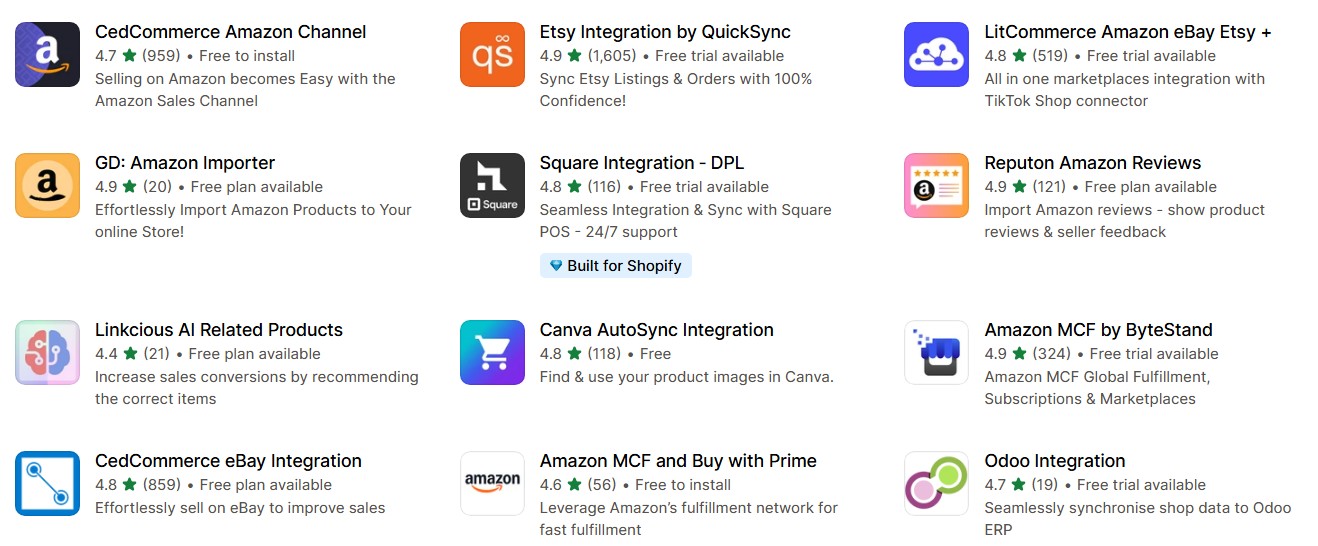
Option 1: The Third-Party Integration Apps
Dedicated Multi-Channel Selling Apps such as Shopify Marketplace Connect (formerly Codisto), CedCommerce Amazon Channel, or LitCommerce are all readily available, all well reviewed and all designed to make it a bit easier for most merchants to find their way through that maze I started with.
Here Are the Pros of Integrating Via App:
-
- Can be set up and running in hours, not weeks
- They deal with Amazon’s API mood swings
- Built-in error handling (trust me, you’ll need this)
- Support when Amazon inevitably changes an important something
Here Are the Cons of Integrating Via App:
-
- Monthly fees ($29-299 depending on volume)
- Less control over the logic of you sync
- Generic solutions for specific problems
- Another potential point of failure in your tech stack
Best For: The roughly 50% of Shopify Merchants with more or less straightforward needs here.
Option 2: Amazon’s Native Integration
Amazon offers a direct Shopify integration, but it’s about as feature-rich as a Toronto Maple Leafs playoff run.
Pros:
-
- It’s free (the only real advantage)
- Direct from Amazon (in theory, fewer compatibility issues)
Cons:
-
- Minimal features
- Terrible support
- Lacks sophisticated mapping options
- No bulk editing capabilities
Best For: Testing the waters with under 50 SKUs
Option 3: Custom API Integration
Building your own integration using Amazon’s SP-API and Shopify’s Admin API.
Pros:
-
- Complete control
- Custom business logic
- No ongoing app fees
- Impressive on your resume
Cons:
-
- Months of development time
- Ongoing maintenance nightmare
- You’re responsible when Amazon breaks things
- Expensive developer resources
Best For: eCommerce brands with specific requirements.
Understanding the Challenges of Amazon Integration
Let’s talk about what makes integrating with the Amazon Marketplace special (and by special, I of course mean an especially difficult challenge, for even experienced ecommerce developers).
The Amazon Featured Offer (Formerly the “Buy Box”)
The “Featured Offer” is that little white box where 82% of Amazon sales happen. And winning it? That’s where this whole mutually beneficial ecommerce marketplace integration thing can get at least a tad nerve wracking. You see. Amazon’s Buy Box algorithm weighs multiple factors to determine which seller earns the coveted “one-click” position. And while your pricing strategy will be crucial, Amazon now emphasizes performance metrics, to ensure excellent customer experiences here.
Key Factors:
-
- Price (but not always the lowest)
- Fulfillment method (FBA gets preference)
- Seller metrics (late shipments will kill you)
- Inventory depth
- Customer service performance

The Dirty Secret: Even if you’re the only seller of your private label product, you can still lose the Featured Offer if Amazon isn’t happy with your metrics. That’s right, your own product page can show your product as “Currently Unavailable” even if you have like 1,000 units in stock. Welcome to Amazon.
FBA vs FBM Shipping
Fulfillment by Amazon (FBA):
-
-
- Prime eligibility (huge for conversion)
- Amazon handles customer service
- Better Buy Box odds
- Storage fees that’ll make your eyes water
- Loss of control over the customer experience
-
Fulfillment by Merchant (FBM):
-
-
- No Prime badge
- You keep control
- Lower fees
- Worse Buy Box performance
- You handle shipping (hope you like late nights at your postal service provider)
-
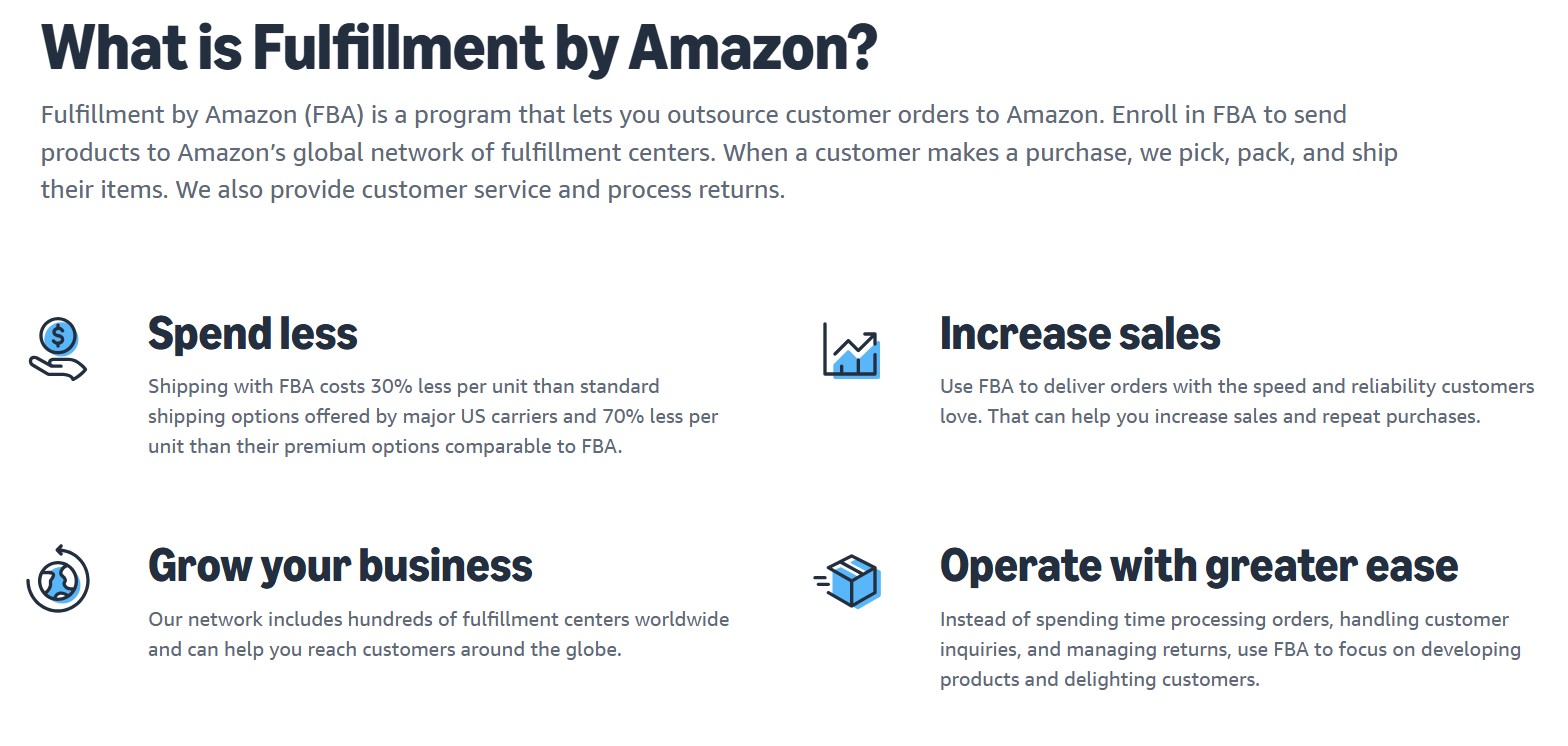
Pro Tip: The hybrid approach works best. Use FBA for your best sellers but FBM for long-tails.
The Amazon Marketplace’s Fee Structure
When you add them all up, various Amazon fees could easily eat 30-40% of your profit margin. So let’s take a moment and break down what you’ll really be paying for the privilege of selling on Amazon.
-
- Return Processing Fees: $2.12-6.85 per unit in high-return categories
- FBA Fees: $3.50-5.50 for small items, scaling up dramatically
- Storage Fees: $0.87-2.40 per cubic foot (higher during Q4)
- Long-term Storage Fees: Don’t even get me started
- Advertising Costs: Because organic visibility is so 2010
- Referral Fees: 8-15% depending on category (Amazon Seller Central, 2025)
The Technical Implementation of Your Amazon Integration
Now, enough fee related doom and gloom. Let’s actually connect these ecommerce platforms. I’ll use Shopify Marketplace Connect as our example this time around, just to mix things up a bit.
Step 1: Check Prerequisites
Ok. Before you touch anything else …
- Verify That Your Shopify Data Has:
- Clean, unique SKUs for all of your products
- High-quality, high-resolution, images (minimum 1000×1000 pixels)
- Complete product descriptions
- Accurate weights and dimensions (Amazon will ding you for any errors)
- Make Sure Your Amazon Account Has:
-
- Professional Seller status active
- Tax interviews completed (yes, plural)
- Bank account verified
- Brand Registry approved (if applicable)
Step 2: App Installation and Configuration
Install Marketplace Connect from Shopify’s App Store. The setup wizard will walk you through:
-
- Account connection: You’ll authenticate via OAuth (modern authentication, yay!)
- Marketplace selection: Start with one, add others later
- Business configuration: Tax settings, shipping profiles, return policies
Step 3: Marketplace Mapping Marathon
This is where you’ll spend most of your time. And maybe even question one or two life choices. )
Mapping Your Products:
-
- Map Shopify collections to Amazon categories
- Set up variation themes (size/color combinations)
- Configure product identifiers (UPC, EAN, ASIN)
- Create pricing rules (markup for Amazon fees)
Category Specifics: Amazon Marketplace has different requirements for every. Single. product. category. Clothing needs material composition. Electronics need voltage specifications. Books need ISBNs. It’ll be like a treasure hunt but the treasure will basically always be a bit more work.
Step 4: Optimizing Your Product Listings
Your slender brand-narrative-focused product descriptions won’t cut it on Amazon. You’ll need:
Titles: Unflinchingly keyword-stuffed, but still readable. For example: “Organic Capybara Treats for Senior Chinchilla Cousins – Grain-Free, High-Protein, Support Dental Health – Made in Chile – 473.176 ml Bag – Fresh Orange Bark Flavor!”
Bullet Points: Which will be simple. All you’ll have to do for each of your products is pick the Five points that hit every possible search term while also answering every conceivable question.
Backend Keywords: Where you get to stuff in even more your sweet sweet targeted keywords.
Step 5: Inventory Synchronization
This is where the magic (and the problems) happen:
-
- Set conservative buffer stock (20% minimum)
- Configure sync frequency (real-time is ideal but can hit rate limits)
- Set up multi-location rules if applicable
- Test with a small batch first (seriously, don’t skip this)
Step 6: Order Flow Configuration
Orders need to flow from Amazon to Shopify seamlessly:
-
- Enable order imports with proper tagging
- Set up fulfillment synchronization
- Configure tracking upload automation
- Test the entire flow with a real purchase
Winning As An Amazon Marketplace Seller
Once you’ve got the basics working, it’s time to get strategic.
The Brand Building Backdoor: Amazon may own the customer relationship, but you can still build your brand:
Package Inserts: Your secret weapon. Include:
-
-
- Thank you cards with personality
- Discount codes for your Shopify store
- Social media invitations
- Care instructions that subtly promote your brand
-
Follow-up Sequences: Use Amazon’s limited messaging capabilities wisely:
-
-
- Request reviews (carefully, within Amazon’s rules)
- Provide exceptional support
- Build reputation that transcends the platform
-
The Data Intelligence Game
Amazon gives you data, just not the data you want. Here’s how to extract value:
-
- Search Terms Reports: Gold mine for understanding customer intent
- Brand Analytics: If you have Brand Registry, this is incredibly valuable
- Advertising Reports: See what converts and what doesn’t
- Return Reports: Painful but necessary for product improvement
Use this intelligence to improve both your Amazon and Shopify strategies.
Multi-Channel Fulfillment (MCF)
Here’s a brain-bender. Did you know that you can use Amazon’s FBA to fulfill Shopify orders?
Here Are the Benefits:
-
- Leverage Amazon’s shipping network
- Maintain inventory in one place
- Often cheaper than traditional 3PLs
Here Are the Drawbacks:
-
- Amazon-branded boxes (unless you pay extra)
- Limited customization options
- Giving more data to the overlords
Common Pitfalls and How to Avoid Them
No deep dive here, just some avoidable mistakes that I’ve seen other Shopify Merchants make:
The Race to the Bottom
Look. It’ll be pretty tempting to match the lowest price to try and win the Buy Box. Don’t. You’ll end up selling your $20 products for $12 and wondering how your profit margins disappeared. Instead:
-
- Focus on value-added bundles
- Emphasize your unique selling proposition
- Use FBA strategically for Buy Box advantage
- Let the cheap sellers duke it out
The Inventory Management Conundrum
Running out of stock on the Amazon Marketplace is on the list of things that can really hurt your rankings and overstocking will mean spending more on long-term stock storage. Your solution …
-
- Use sales velocity data religiously
- Implement just-in-time restocking
- Keep safety stock outside Amazon
- Monitor your IPI (Inventory Performance Index) score
The Amazon Review Trap
The review policies on Amazon are as strict or even stricter than Canadian gun laws. And in my opinion, they totally should be. One wrong move can get sellers suspended. So, please never…
-
- Incentivize reviews (even accidentally)
- Message customers outside Amazon’s system
- Try to game the system with fake reviews
- Neglect negative feedback
When to Call in the Professionals
Look I love a good, frustrating, but oddly satisfying custom development challenge as much as the next good Canadian kid, but sometimes it’s time to pack up the Do It Yourself wagon and call in mounties. Know what I mean? So you’ll wanna consider hiring a professional when:
-
- You’re managing over 1,000 SKUs
- You need custom bundling or kitting logic
- Multi-marketplace expansion is on the horizon
- The opportunity cost exceeds agency fees
- You value your remaining hair follicles . )
This is exactly where Bold Match can come in handy. We’ve vetted agencies that specialize in complex multi-channel integrations. Now, don’t worry that wasn’t the start of a long sales pitch. Just saying. Sometimes you need Reliable Experts who know every API quirk and every policy gotcha.
Is Amazon Marketplace Integration Worth It?
You might be wondering if integrating with Amazon is worth the hassle. Here’s my honest take:
Yes, Marketplace Integration Will Be Worth It If:
-
-
- You have proven products with good margins
- You can handle the operational complexity
- You view it as a customer acquisition channel
- You have a plan to convert Amazon customers to your brand
-
No, Marketplace Integration Won’t Be Worth It If:
-
-
- You’re barely profitable on Shopify
- You can’t compete on price or value
- You don’t have the resources to manage another channel
- You’re not prepared for the fees
-
The Future of the Shopify-Amazon Relationship
The Shopify-Amazon dynamic is frankly dynamic. In that it’s evolving as Amazon slowly makes it easier to integrate, and as Shopify builds tools to help merchants grow from single-channel, to multi-channel to omni-channel brands. Here’s the progress toward that, that we’ve been Seeing:
-
- Better API Quality, Stability and Observability (finally)
- More sophisticated marketplace integration tools
- Increased focus on brand building with “reasonable” constraints
- Growing acceptance of multi-channel selling as the norm for online retailers
The merchants who’ll win the race to successful omni-channel ecommerce diversification will be the ones who treat Amazon as just one more piece of a robust reach expansion strategy, not the end-all-be-all of retail.
Embracing the Complexity of a Multi-Channel e-Commerce Operation
Integrating Shopify with Amazon is like learning to ice skate. You’ll be graceful … eventually. But the level of difficulty here is also the opportunity here. Ice skating is impressive because it’s hard and while your competitors are busy being scared of the technical complexities, the confusing fee structures, and intentionally labyrinthine product policy mazes, you can build a profitable channel that transforms your business. The key is going in with eyes wide open. Amazon isn’t your friend, but they don’t have to be your enemy. They’re a tool, a powerful, but occasionally infuriating tool, that can dramatically expand your retail reach if they’re integrated successfully.
So start small, test everything, grow, but always keep your Shopify store as your home base. Because at the end of the day, the customers you own are worth ten times the customers Amazon will let you borrow. And remember. If this was easy, everyone would be doing it. The complexity will be a moat around your success. Think that’ll be it, from me, for today. Gotta go Check a few PRs. Hope this helps you integrate in a way that actually works well for your business! But, if you need more than one post’s worth of help navigating the technical labyrinth popularly known as the Amazon marketplace, please do reach out. That’s what we built Bold Match to do. To connect Shopify Merchants with Agencies who eat technical labyrinths for breakfast. Now go make your tech stack work smarter, not harder! — Eric B.
Integrating Your Shopify Store With Amazon DIY
Supplies:
Amazon Professional Seller Account
Shopify store with complete product data
UPC or EAN codes for all products
Product images meeting Amazon requirements (minimum 1000×1000 pixels)
Registered trademark for Brand Registry (recommended)
Tools:
Integration app (Shopify Marketplace Connect, CedCommerce, or LitCommerce)
Amazon Seller Central account
Shopify Admin access
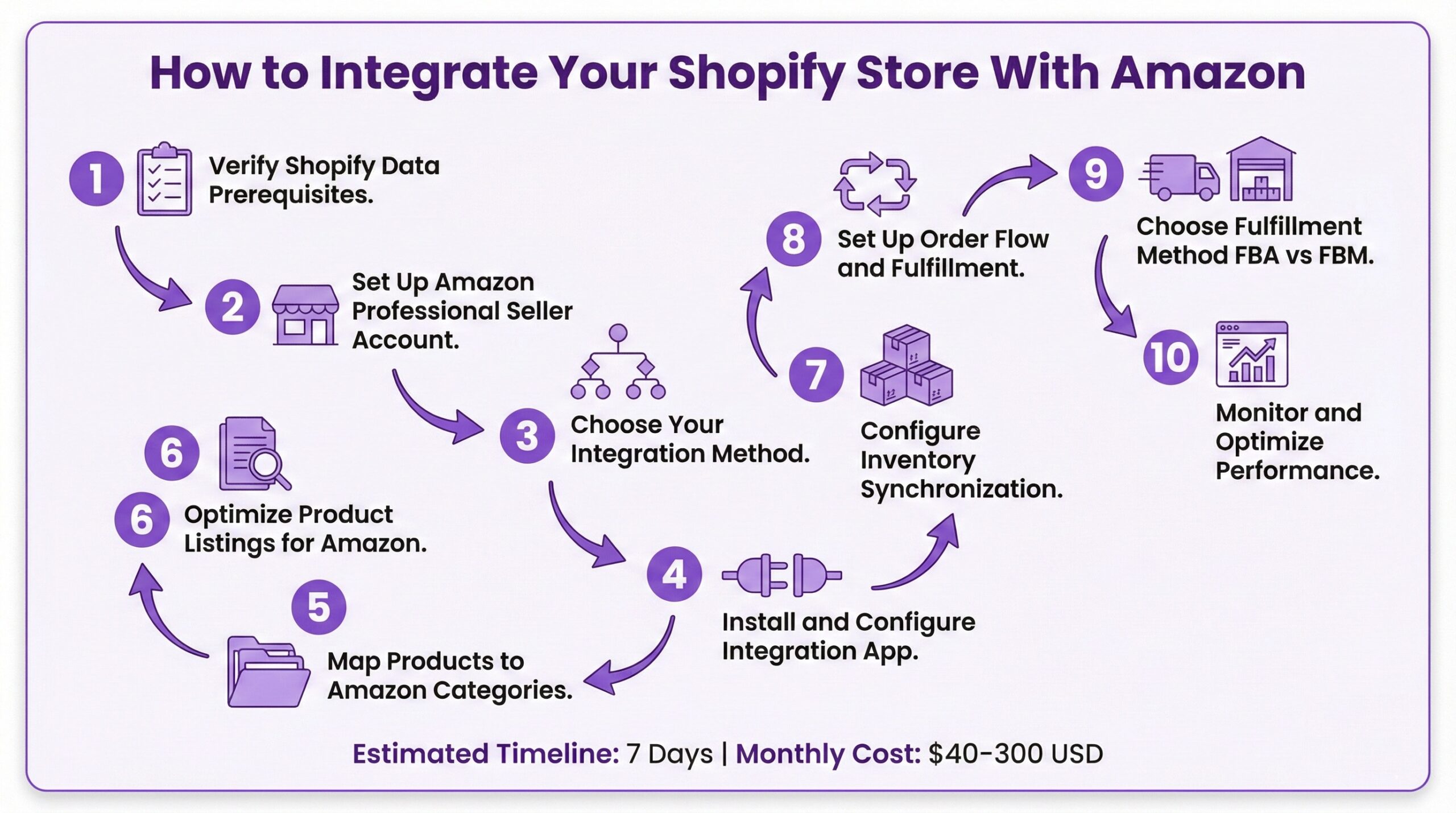
Time needed: 7 days
Quick DIY guide for Shopify merchants to integrate their store with Amazon Marketplace, including account setup, product mapping, inventory synchronization, and fulfillment configuration.
- Verify Shopify Data Prerequisites
Prepare your Shopify store data before integration. Ensure all products have clean unique SKUs, high-resolution images at minimum 1000×1000 pixels, complete product descriptions, and accurate weights and dimensions.
- Set Up Amazon Professional Seller Account
Create or verify your Amazon Professional Seller account ($39.99/month). Complete all tax interviews, verify your bank account, and apply for Brand Registry if you have a registered trademark.
- Choose Your Integration Method
Select an integration approach based on your needs. Third-party apps like Shopify Marketplace Connect offer the fastest setup. Amazon’s native integration is free but limited. Custom API integration provides maximum control but requires significant development resources.
- Install and Configure Integration App
Install the integration app you’ve chosen from the Shopify App Store. Complete the setup wizard including OAuth account connection, marketplace selection, and business configuration for tax settings, shipping profiles, and return policies.
- Map Products to Amazon Categories
Configure product mapping between Shopify and Amazon. Map Shopify collections to Amazon categories, set up variation themes for size and color combinations, configure product identifiers including UPC, EAN, and ASIN, and create pricing rules that account for Amazon fees.
- Optimize Product Listings for Amazon
Rewrite your product content for Amazon’s marketplace. Create keyword-rich titles, write five bullet points covering search terms and customer questions, add backend keywords, and ensure all category-specific requirements are met.
- Configure Inventory Synchronization
Set up inventory sync between platforms. Configure a conservative buffer stock of at least 20%, set sync frequency, establish multi-location rules if applicable, and test with a small batch of products before full rollout.
- Set Up Order Flow and Fulfillment
Configure order management between platforms. Enable order imports with proper tagging, set up fulfillment synchronization, configure tracking upload automation, and test the entire flow with a real purchase before going live.
- Choose Fulfillment Method
Decide between Fulfillment by Amazon (FBA) and Fulfillment by Merchant (FBM). FBA offers Prime eligibility and better Buy Box odds but includes storage fees. FBM keeps control with you but reduces Buy Box performance. Consider a hybrid approach using FBA for bestsellers and FBM for long-tail products.
- Monitor and Optimize Performance
Track key metrics and optimize your Amazon presence. Monitor your Buy Box percentage, review search term reports, analyze advertising performance, and maintain strong seller metrics to protect your Featured Offer eligibility.