
Building a Hybrid D2C + B2B Wholesale Brand on Shopify
Written and edited by: Eric
How goes it everyone? 🛹
Eric Boisjoli here again on Bold Match. Jay warned you all I’d be back before the new year so here I am. Because today we’re tackling something that’s come up constantly in my conversations with growing Shopify store owners lately. The question of whether to add wholesale to an existing direct-to-consumer operation or whether to launch both e-commerce channels simultaneously from the start.
The short version is that running D2C and B2B from a single Shopify store is not only possible, it’s increasingly becoming the default architecture for mid-market brands. That’s right. According to Shopify’s own data, B2B gross merchandise volume on their platform surged 109% year-over-year in Q1 2025. That’s not a rounding error. That’s a fundamental shift in how e-commerce merchants are thinking about revenue diversification. But of course “possible” and “straightforward” aren’t exactly what I’d call synonyms.
Building a hybrid store that serves individual consumers and wholesale buyers from the same backend requires understanding how Shopify’s B2B features actually work under the hood. And like most things in e-commerce, the big red devil’s in the implementation details.
So let’s walk through this together.
Why Hybrid B2B + DTC on Shopify Makes Sense
Before we get into the technical weeds, let’s talk strategy for a minute. Why would an online retailer want to complicate their operation by selling to both consumers and businesses? Well. The math is actually crazy compelling. D2C margins are higher per unit, but customer acquisition costs keep climbing. Every platform wants its cut. Every ad network wants more budget. Meanwhile B2B orders are larger, more predictable, and come with built-in repeat purchase behavior. A wholesale buyer who orders quarterly isn’t churning the way individual customers do.
Like. According to Shopify’s 2025 data, 80% of B2B commerce is now expected to take place online. Now. I don’t mean to say that the old model of phone calls, PDF catalogs, and handshake deals at trade shows is disappearing entirely, I just mean that it’s rapidly becoming the odd exception rather than the norm. Wholesale buyers today expect the same self-service experience they get when shopping for themselves on Amazon. The hybrid model lets store owners capture both revenue streams without maintaining separate platforms, duplicate inventory systems, or parallel customer databases. One backend. Two audiences. Unified operations. Perfection.
That’s the theory anyway. Making it work requires understanding three core architectural decisions.
The D2C + B2B Foundation… Company Accounts
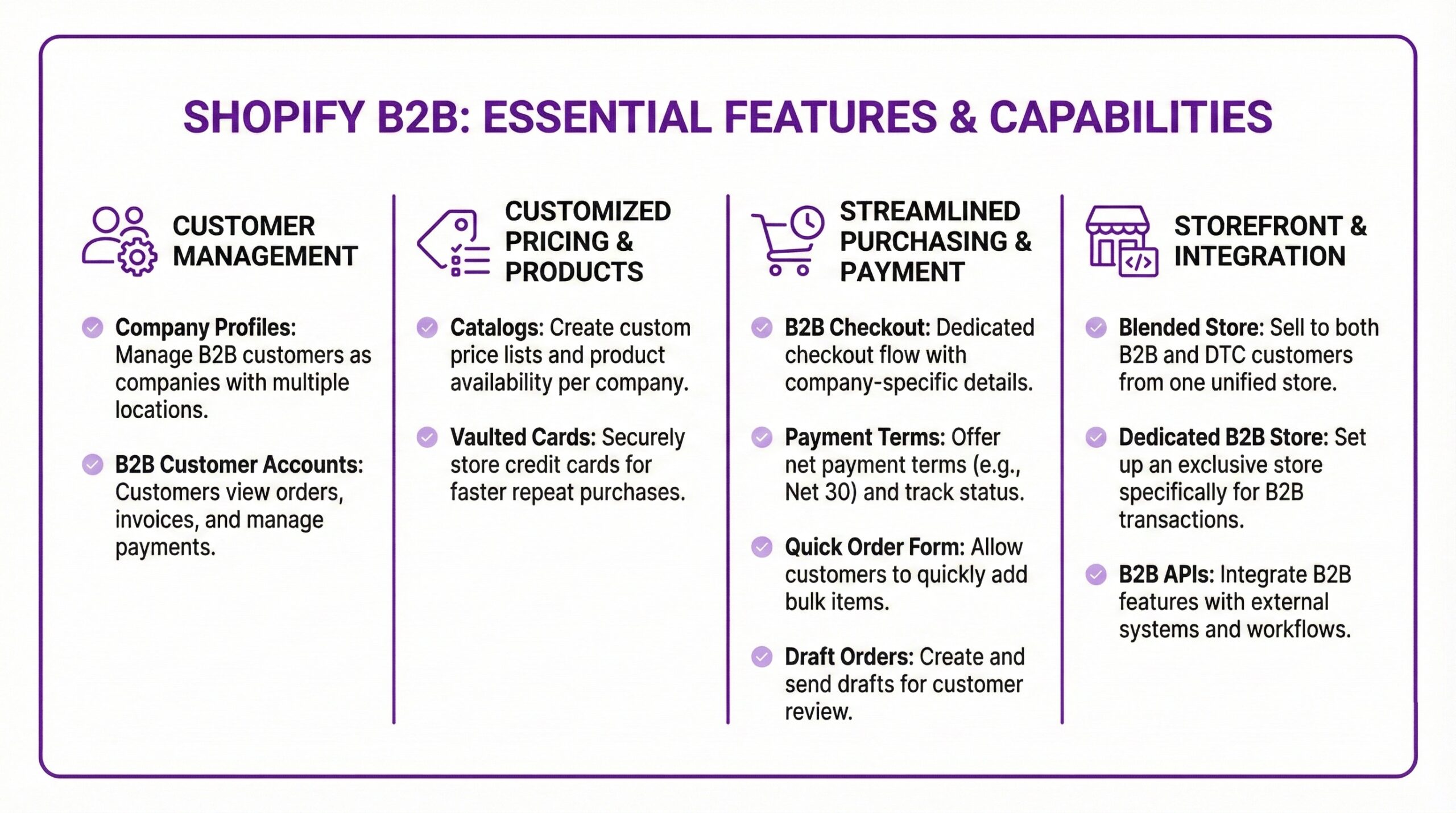
Everything in Shopify’s B2B system revolves around the concept of company accounts. And if you’re coming from a pure D2C background, this is where the mental model shift happens. In D2C, you have customers. Individual humans with email addresses and shipping preferences. In B2B, you have companies. And companies are containers that hold multiple people, multiple locations, and multiple permission levels.
The data model works something like this… A company account represents a business entity. Think “Acme Distributors” or “Regional Boutique Chain.” Under that company, you can have multiple locations, like different warehouses or retail branches. And at each location, you can have multiple users with different roles. Shopify currently supports two user roles for B2B. Location Admin can manage account details and view all orders for their location. A buyer can only place orders. Which will matter operationally because a regional manager might actually need to see everything their branch orders, whereas an individual buyer might just need to shop.
When a B2B customer logs in, they select their company and location, and the entire storefront experience transforms based on that context. They see their negotiated prices. Their payment terms. Their specific product catalog. All rendered dynamically from the same theme and product database you use for D2C. The technical implementation uses Shopify’s Customer Account API, and the company association is stored as metadata on the customer object. For developers, this means you can query company relationships through GraphQL and build custom experiences on top of the native functionality.

Custom Catalogs & Price Lists to Unify B2B + B2C
Here’s where the Plus requirement becomes non-negotiable for in big serious quotes serious implementations. You see. Shopify Plus lets you create catalogs that control exactly which products each buyer sees and what prices they pay. This isn’t just “apply a 20% discount to wholesale customers.” It’s granular, variant-level control over your entire product offering. A catalog can include overall percentage adjustments. Say for instance, all products at 25% off for Gold tier distributors. It can also include fixed prices for specific products that override the percentage. And it can completely hide products that aren’t relevant to a particular buyer segment.
You can set minimum order quantities per product. Maximum quantities if inventory is limited. Case pack increments that force buyers to order in multiples. And price breaks that kick in at different volume thresholds. For example, let’s walk through a hypothetical but realistic but still fun scenario. Picture if you will a company called “Prairie Griptape Co.” that manufactures custom-printed skateboard griptape for the raddest imaginable Gleaming the Cube superfans fans right here in sunny Winnipeg. They sell individual sheets to individual skaters through their D2C channel and bulk rolls to skate shops and skating gear distributors through wholesale.
Their D2C customers see standard retail pricing. $18 for a custom-printed sheet. No minimums. Buy one sheet for your setup or grab a few extras because you know you’re going to trash your grip trying to land that kickflip on the ledges at The Plaza.
Their wholesale buyers log in and see a completely different experience. The same griptape shows at $9 per sheet with a 50-sheet minimum and a 25-sheet increment. Buy 50, 75, 100, or 125. Order 200 or more and the price drops to $7.50. The checkout displays Net 30 payment terms instead of immediate credit card processing. A shop like Sk8 Skates, which has been holding down the Winnipeg scene since 1987, would see their negotiated distributor pricing and maybe even early access to limited colorway drops.
Now. All of this runs from one Shopify store, one product database, one inventory count. The catalog assignment happens at the company location level. So if Prairie Griptape has a regional distributor with three warehouses across the prairies, each warehouse can have different catalog assignments based on regional product availability or negotiated terms.
Checkout Extensibility and Hybrid B2B and DTC
One of the bigger changes in 2025 is full B2B support in Shopify’s Checkout Extensibility framework. This matters because the checkout is where D2C and B2B experiences diverge most dramatically. B2B checkouts need to support purchase order numbers. VAT and GST collection with proper display. Payment terms selection. Custom shipping methods based on order size or company agreement. None of these exist in a standard D2C checkout.
With Checkout Extensibility, developers can add these fields conditionally. A consumer checking out sees the normal flow. A company buyer sees additional fields for PO numbers, gets payment term options instead of immediate payment, and might see completely different shipping rate calculations. The implementation uses Shopify Functions, their serverless compute layer for checkout logic. Functions let you write custom discount, shipping, and payment rules that execute on Shopify’s infrastructure. For hybrid e-commerce stores, you’d typically write Functions that check whether the customer is associated with a company and branch the logic accordingly.

What If You Wanna Go Hybrid But You’re Not on Plus?
Everything I’ve described so far requires Shopify Plus at $2,500 per month. That’s a real barrier for growing retailers who want B2B functionality but aren’t ready for enterprise-level platform costs. The good news is that third-party apps have matured significantly to fill this gap. The bad news is that you’ll be assembling a Frankenstein’s monster of app integrations instead of using native functionality.
Here are the most commonly used alternatives for non-Plus merchants.
SparkLayer runs $49 to $449 per month and sits on top of your existing Shopify store. It provides customer-specific pricing, B2B login portals, quick order forms, and sales agent ordering. The app handles the B2B logic externally while still creating orders in your normal Shopify admin. Setup is more complex than native Plus features, but SparkLayer has become the go-to solution for merchants who need robust B2B without the Plus price tag.
BSS B2B Wholesale Solution starts at lower price points and covers custom pricing, volume discounts, customer registration workflows, and net terms. It integrates with Shopify POS if you also have physical retail. The tradeoff is that you’re managing B2B configuration in a separate app interface rather than your main Shopify admin.
Wholesale Hub focuses specifically on pricing control with percentage discounts, custom variant prices, and quantity breaks. It’s more focused than SparkLayer or BSS, which can be an advantage if you just need pricing functionality without the full B2B workflow.
The honest assessment is that non-Plus B2B implementations work, but they require more configuration, more app dependencies, and more ongoing maintenance. For retailers doing occasional wholesale or testing the B2B waters, apps are a reasonable starting point. For brands where B2B represents a significant revenue channel, the native Plus functionality usually justifies the platform cost.
Blended D2C + B2B Shopify Store Architecture
Now let’s talk about how these pieces fit together technically. Shopify uses the term “blended store” for implementations that serve both D2C and B2B from a single storefront. The architecture works like this. You have one product catalog with one inventory count across all your SKUs. This lives in your normal Shopify admin. When a consumer visits your store without logging in, they see your standard retail experience with retail pricing.
When a B2B buyer logs in and selects their company, Shopify checks their company profile, finds the assigned catalogs, and dynamically renders product visibility and pricing based on those assignments. The same product page template renders different content depending on customer context. Behind the scenes, this uses Shopify’s Liquid templating system with conditional logic. The customer.b2b? check tells your theme whether the current session is a B2B buyer. From there, you can conditionally show different add-to-cart behavior, display net terms instead of credit card icons, or surface bulk ordering widgets.
For headless implementations using Hydrogen or a custom frontend, you’d query the Storefront API with customer context and receive pre-filtered product data with company-specific pricing already applied. The inventory implications are significant. When a D2C customer buys 3 units and a wholesale buyer orders 300 units, both transactions draw from the same inventory pool. This eliminates the duplicate stock problems that plague merchants running separate D2C and B2B stores, but it also means you need robust inventory management to avoid overselling.
Workflow Automation with Shopify Flow
Shopify Flow, their native automation tool, now has full support for B2B-specific triggers and actions. You can build workflows that automatically assign payment terms when a new company is created. Send invoices when orders are placed by specific customer segments. Update ERP systems when B2B orders ship. Route high-value orders to sales team review before processing.
For our hypothetical Prairie Griptape Co., a Flow automation might work like this. When a new company is created, assign Net 30 terms if their billing address is domestic, Net 15 if international. When an order exceeds $5,000, send a Slack notification to the sales team. When an order is fulfilled, trigger an invoice through QuickBooks or Xero. The B2B-specific triggers include company created, company location created, and order placed by company. The actions include assign payment terms, send invoice, and update company metafields. This automation layer is what transforms a hybrid store from “technically possible” to “operationally efficient.”
Common Pitfalls of Hybrid Implementations
Let me share some of the issues we see merchants run into when building hybrid stores.
Inventory allocation conflicts happen when you don’t account for B2B order sizes in your safety stock calculations. A wholesale order can clear out inventory that D2C customers were expecting to be available. The solution is usually setting aside B2B-specific inventory using Shopify’s inventory locations or implementing back-order logic for wholesale.
Pricing leakage occurs when B2B prices accidentally become visible to retail customers. This usually happens through misconfigured catalog assignments or theme code that doesn’t properly check customer context before displaying prices. The embarrassment of a consumer seeing wholesale pricing is real. Test your theme thoroughly with different customer profiles.
Tax complexity multiplies in hybrid stores. D2C customers pay sales tax. B2B customers often provide resale certificates and expect tax-exempt purchasing. Shopify handles this at the company level, but you need proper tax configuration and documentation workflows to stay compliant.
Payment term management requires actual accounts receivable processes. When you offer Net 30 terms, you’re extending credit. Someone needs to track aging invoices, send reminders, and manage collections. This operational burden surprises merchants who are used to immediate payment at checkout.

Getting Expert Agency Help with Implementation
Look. I’ll be completely honest. Building a hybrid D2C + B2B store is one of those projects where the complexity scales with your specific requirements. A simple implementation with one customer tier and basic pricing adjustments could maybe be weekend project territory for the right specialist consultant. A sophisticated implementation with multiple customer segments, ERP integration, and custom checkout flows is a multi-month agency resource straining engagement.
If you’re considering this kind of architecture and want to talk to a partner agency with expert who’ve done it before, that’s literally what we built Bold Match for. We can connect you with development partners who legit specialize in B2B implementations and understand the technical nuances. Right. I kinda need to go debug an async race condition in a customer sync pipeline that’s causing duplicate company records. Then a quick session at Pitikwé before the after-school crowd shows up. Go make your tech stack work smarter, not harder! – Eric
Frequently Asked Questions (FAQ)
Can I run B2B and D2C from one Shopify store?Yes. Shopify calls this a “blended store” architecture. Both customer types share the same product catalog, inventory, and theme. The B2B experience is personalized through company accounts, custom catalogs, and conditional pricing that renders dynamically when wholesale buyers log in. This approach eliminates duplicate inventory management and lets you operate both channels from a single admin.
Do I need Shopify Plus to Get B2B features?
Yes. Native B2B features like company accounts, custom catalogs, and price lists require Shopify Plus at $2,500 per month. But “native” was doing some heavy lifting back there. Non-Plus merchants can use third-party apps like SparkLayer, BSS B2B Wholesale Solution, or Wholesale Hub to add B2B functionality, though these require more configuration and don’t integrate as seamlessly as native features.
What’s a company account in Shopify B2B?
Easy. A company account represents a business entity in Shopify’s B2B system. Unlike individual customer accounts, companies can have multiple locations like warehouses or retail branches and multiple users with different permission levels. Each location can have its own catalog assignments, payment terms, and shipping rules.
How does pricing work for B2B customers?
Shopify Plus uses catalogs to control B2B pricing. You can set overall percentage discounts, fixed prices for specific products, volume-based price breaks, and quantity rules like minimums and case pack increments. When a B2B buyer logs in and selects their company location, they see only the products and prices assigned to their catalog.
Can B2B customers pay on terms instead of immediately?
Yes. Yes they can. Shopify Plus supports Net 15, Net 30, Net 60, and custom payment terms for B2B customers. Terms are assigned at the company location level. Orders placed on terms generate invoices that you manage through your normal accounts receivable process. Third-party apps offer similar functionality for non-Plus stores.
What happens to inventory when both D2C and B2B orders come in?
Both channels draw from the same inventory pool. This prevents duplicate stock issues but requires careful inventory management since a large wholesale order can deplete stock that D2C customers expected to be available. Some merchants use Shopify’s inventory locations to allocate stock specifically for B2B fulfillment.
How do I keep my D2C customers from seeing my wholesale prices?
Catalog assignments control price visibility. Products and prices in B2B catalogs only appear to customers associated with companies that have access to those catalogs. Your theme should also check the customer.b2b? condition before displaying any B2B-specific content or pricing to prevent accidental exposure.
What 3rd party apps work best for B2B on non-Plus Shopify stores?
Well. SparkLayer arguably offers the most comprehensive B2B functionality for non-Plus stores, including customer-specific pricing, order forms, and sales agent features. BSS B2B Wholesale Solution provides similar capabilities at lower price points. Wholesale Hub is more focused specifically on pricing control. Most merchants combine multiple apps to replicate native Plus features.
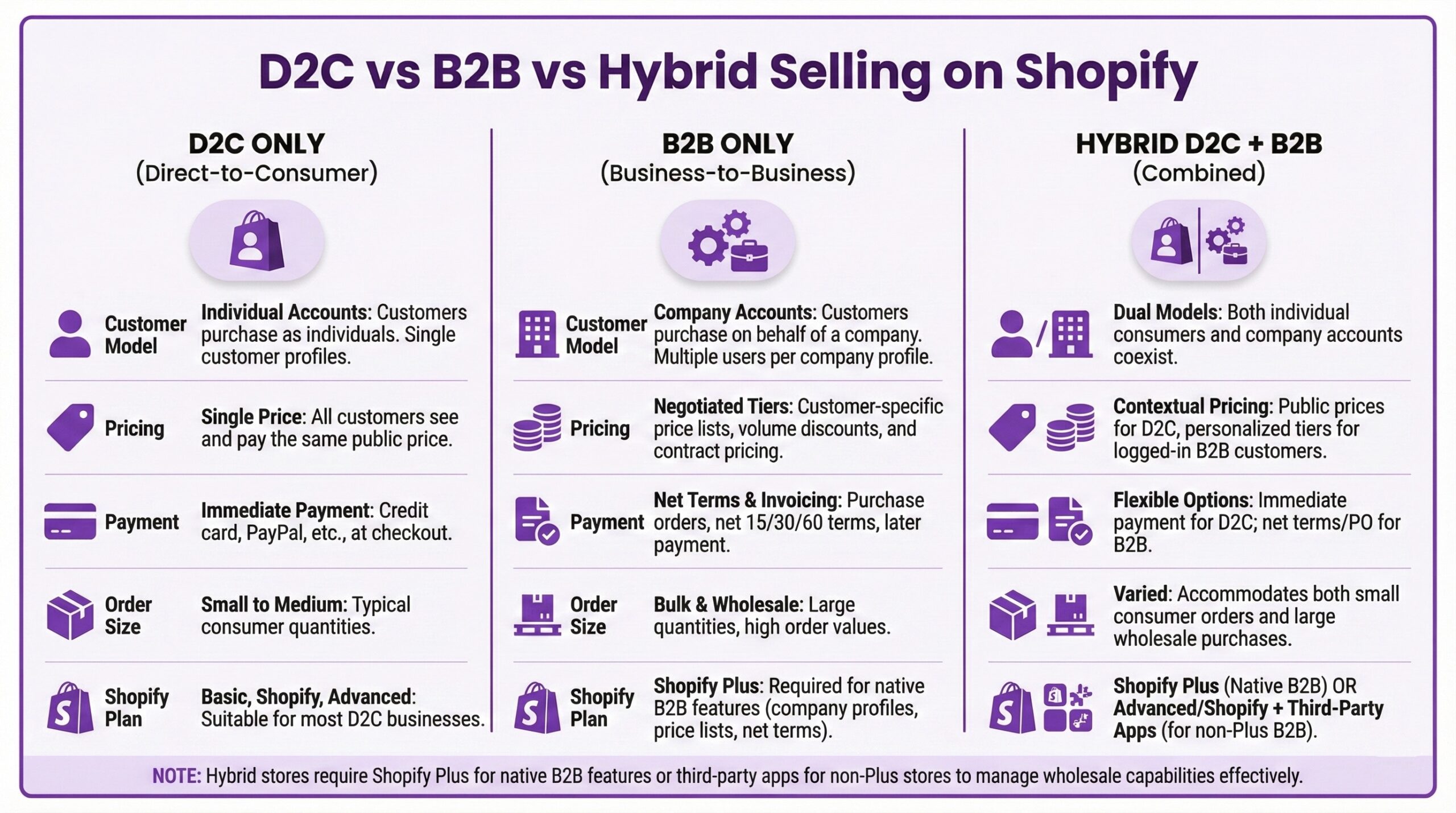
B2B vs D2C vs Hybrid D2C + B2B Comparison Table
|
Dimension |
D2C Only |
B2B Only |
Hybrid D2C + B2B |
|
Customer Model |
Individual accounts |
Company accounts with locations and users |
Both, with dynamic experience switching |
|
Pricing |
Single retail price per product |
Negotiated per-customer or tiered |
Retail default with company-specific overrides |
|
Payment |
Immediate checkout |
Net terms, invoicing, purchase orders |
Both based on customer type |
|
Order Size |
Usually 1-5 units |
Often 50-500+ units |
Full range from single items to bulk |
|
Checkout |
Standard Shopify checkout |
Custom fields for PO numbers, tax exemption |
Conditional checkout experience |
|
Inventory |
Single pool |
Single pool |
Single pool, requires allocation planning |
|
Catalog |
All products visible |
Filtered by company assignment |
Context-aware visibility |
|
Shopify Plan Required |
Any plan |
Plus for native features |
Plus for native features |
|
Third-Party Apps |
Minimal |
SparkLayer, BSS, etc. for non-Plus |
SparkLayer, BSS, etc. for non-Plus |