
The Questions to Ask Before Replatforming from Magento to Shopify or Shopify Plus
Written and edited by: Eric

How goes it? Eric here. Hope you’re all having Happy Holidays.🎄
Ok so you’re thinking about migrating from Magento to Shopify. Maybe you’ve been watching your hosting bills creep upward every quarter. Maybe your development team just gave you a quote for Magento 2.4.8 compatibility patches that made you wince a bit. Maybe you watched a competitor launch their great big holiday sale in two days while you were still waiting on staging environment approvals.
Whatever brought you here at this time of year, you should rest assured that you’re not alone. Shopify now powers 29% of the U.S. e-commerce market compared to Magento’s 8%, and a good chunk of that growth came from online merchants making exactly the move you’re considering. One thing that really sticks with me anytime I talk to store owners contemplating replatforming is the short distance between a migration that unlocked previously untapable growth potential and one that just wantonly burned through dev budget (while introducing new problems) wasn’t luck or timing. It was them having asked the right questions before they committed.
Sometimes migrations fail because the online retailer assumes Shopify can replicate their custom Magento checkout logic. But I’ve seen them succeed spectacularly because a merchant knew exactly what they needed from day one and built their migration scope accordingly. The questions you ask before signing that contract with a migration agency will shape almost every decision that follows.
Let me walk you through the questions that actually matter.
Why Migrate From Magento to Shopify?
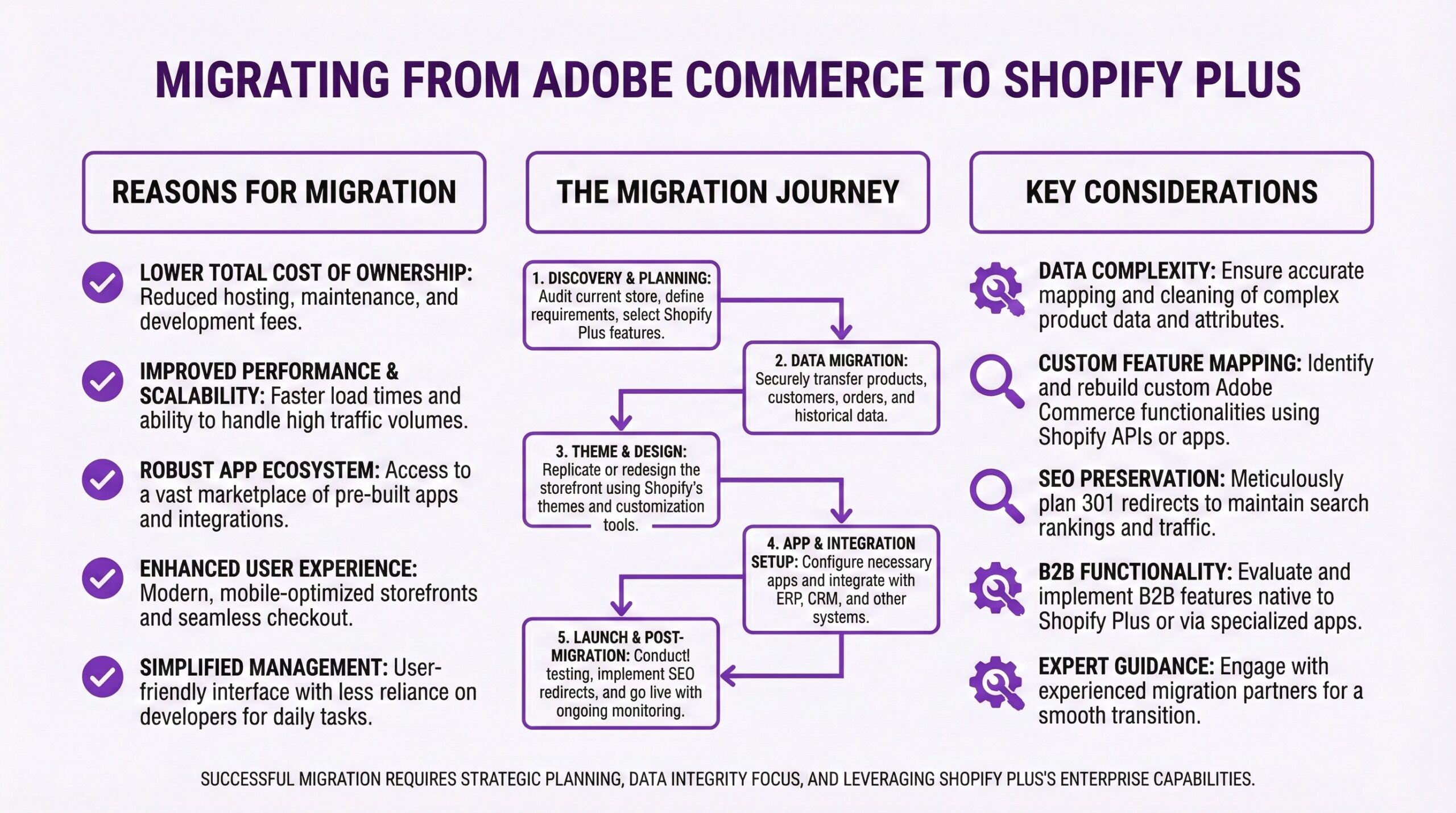
Before you replatform from Magento to Shopify, you need clarity on three fronts. First, understand what you’re actually leaving behind, not just the platform but the customizations, integrations, and workflows your team has built around it. Second, know what you’re moving toward and whether standard Shopify or Shopify Plus fits your requirements. Third, be honest about your timeline, budget, and internal capacity. A migration isn’t a “technology” project. It’s an “operations” project that happens to involve technology.

Is It Magento or Adobe Commerce?
This sounds like a basic question, but the answer fundamentally changes your migration calculus. The two platforms share DNA but live in very different operational universes.
Magento Open Source remains free to download and use, which sounds appealing until you account for hosting, security patching, development, and the general care and feeding that self-hosted platforms demand. Most estimates put the annual total cost of ownership for a mid-sized Magento Open Source store somewhere between $50,000 and $150,000 once you factor in hosting, developer time, security audits, and extension licensing.
Adobe Commerce (the platform formerly known as Magento Enterprise, and more recently, Magento Commerce) starts at $22,000 per year for the on-premises edition and $40,000 or more for Commerce on Cloud. Those figures scale based on your gross merchandise volume, meaning a successful store pays more. As of the 2025 Adobe Summit, Adobe has pivoted hard toward cloud-native solutions. The on-premises deployment model is still technically supported but no longer the strategic focus. If you’re on Adobe Commerce, you’re probably also evaluating Adobe’s new SaaS offering and wondering whether staying in the Adobe ecosystem makes more sense than jumping ship entirely.
The migration question plays out differently depending on your starting point. If you’re on Magento Open Source and spending $100,000 a year on total cost of ownership, a move to Shopify Plus at $2,300 to $2,500 per month might actually reduce your operational burden and free up development resources for growth initiatives instead of maintenance. If you’re on Adobe Commerce Cloud with heavy B2B workflows and custom integrations into Adobe Experience Manager, your migration scope becomes substantially more complex.
What Custom Functionality Can’t You Live Without?
Every Magento store of any maturity has customizations. Some are mission-critical. Others are vestigial code from three product managers ago that nobody remembers why it exists. Before you talk to a single migration agency, you need to audit your current functionality and sort it into categories.
Native Magento features you’re actively using. These usually have direct Shopify equivalents or can be replicated with apps. Catalog management, customer accounts, promotional pricing, basic checkout flows. The translation is usually straightforward.
Third-party extensions. Magento’s marketplace has thousands of extensions, and you’ve probably installed a few dozen over the years. Some, like review systems or email marketing integrations, will have direct Shopify app equivalents. Others, particularly B2B extensions for quote management or complex inventory allocation, may require Shopify Plus features or custom development.
Custom-built functionality. If your team built some custom checkout something to calculate shipping based on dimensional weight, package fragility scores, and regional carrier contracts, you can’t just flip a switch and expect Shopify to handle it. You need to map every piece of custom code to its equivalent Shopify solution, which might be a native feature, an app, Shopify Functions, or custom development.
The honest answer for most merchants is that some customizations will translate cleanly, some will require workarounds, and some will need to be rebuilt or reconceived entirely. Knowing which is which before you start prevents scope creep and budget overruns.
Do You Need Shopify or Shopify Plus?
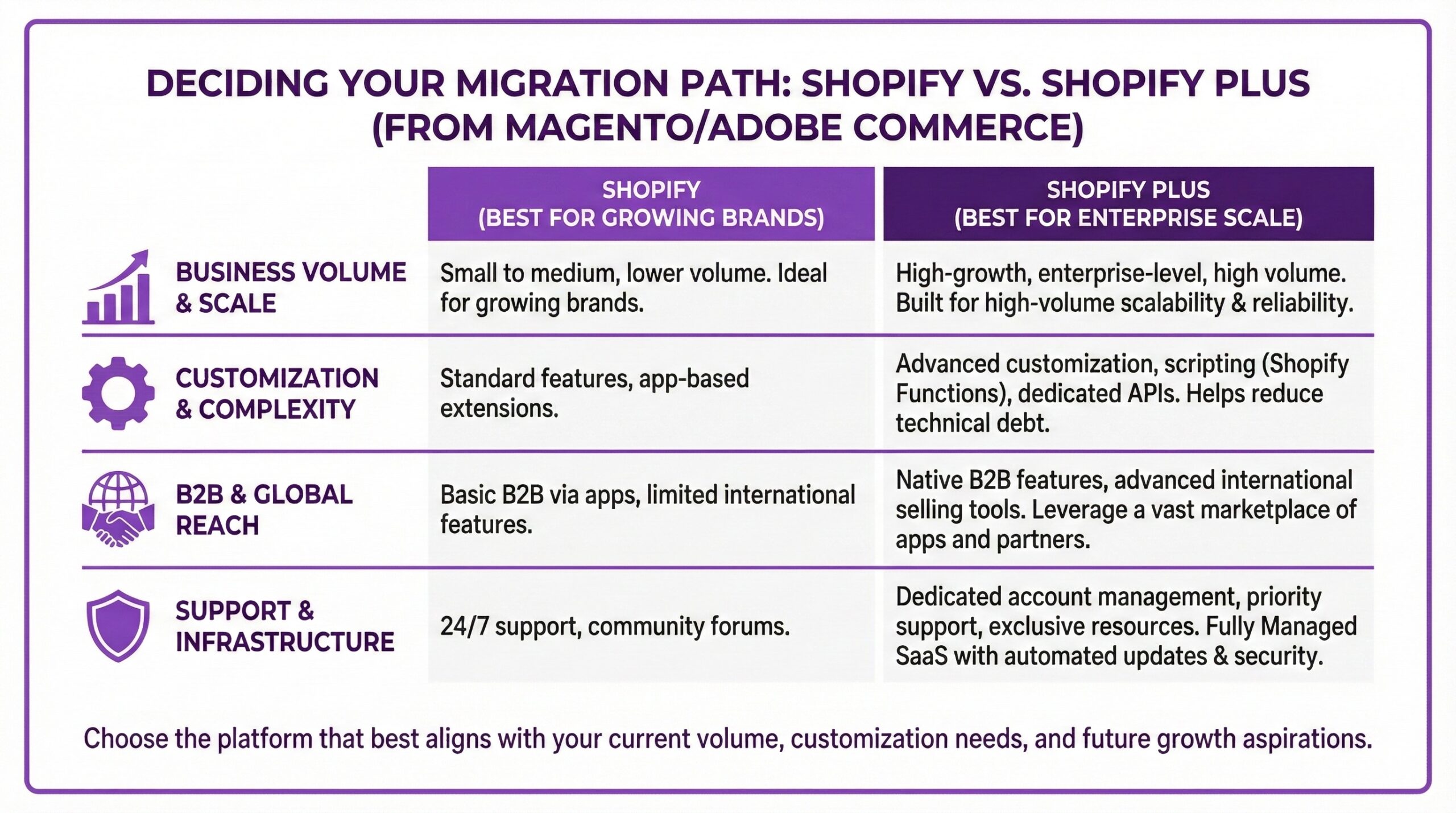
Magento merchants often have customization expectations that push them toward Shopify Plus rather than standard Shopify plans. The question is whether those expectations are genuine requirements or habits formed by what Magento allowed.
Standard Shopify (plans ranging from $39 to $399 per month) works well for most e-commerce retailers running straightforward D2C operations. You get a fully hosted platform, access to Shopify’s theme ecosystem, the app marketplace, and payment processing through Shopify Payments. For many former Magento merchants, particularly those who were on Open Source and struggling with the operational overhead, standard Shopify feels liberating.
Shopify Plus (starting at $2,300 per month on a three-year term or $2,500 for a one-year commitment) becomes relevant when you need advanced checkout customization through Checkout Extensibility, Shopify Flow for complex automation, native B2B selling features, multi-store architectures for international expansion, or higher API call limits for custom integrations. If your Magento store handled wholesale and retail from a single installation using customer group pricing and custom catalogs, Shopify Plus likely makes sense because those B2B features are baked in.
One thing I’d tell any retailer considering this decision. Shopify Plus isn’t just about features. It’s about operational leverage. You get a dedicated Merchant Success Manager, priority support, and access to Shopify’s migration resources. For a complex migration, those resources often justify the price difference.
What Will Happen to Your Equity SEO?
Platform migrations are, historically, an SEO risk. Like. Just joking that you’re considering replatforming around the average experienced SEO expert is a lot like jumping out and going BOO. And they aren’t just being paranoid. Afterall. Every URL that changes, every redirect that breaks, every piece of metadata that doesn’t transfer correctly becomes a potential ranking loss. Sometimes migration equals organic traffic dropping by 40% in the first month and taking six months to recover. But sometimes migrations equals traffic actually increasing because the new site loaded faster and Google rewarded the improved performance.
Google is weird and paradoxically moody (no, really) but the difference between the two outcomes usually comes down to planning. Before you migrate, you need a complete URL mapping strategy that accounts for every product, collection, blog post, and static page on your current site. Magento and Shopify use different URL structures by default, so most of your URLs will change. Every old URL needs a 301 redirect to its new location. Any pages you’re not migrating need redirects to 👉relevant alternatives, not just 404s.
You also need to preserve your metadata as if it were petrol and Google were a wasteland. Product titles, descriptions, names and image alt text should transfer intact. If your Magento site has custom schema markup or structured data that you’ve built up over years, you need to recreate that on Shopify. This is a topic that deserves its own deep dive, and we’ll have a follow-up piece specifically focused on SEO for platform migrations. For now, the key question to ask is whether your migration plan includes a detailed SEO audit and preservation strategy. If your prospective migration agency doesn’t mention SEO right off, that’s a🚩 red flag.
What’s Your Realistic Replatforming Timeline?
Migration agencies often quote timelines between 60 and 120 days for a standard Magento to Shopify migration. I’d encourage you to treat those numbers as optimistic baselines, not guarantees. The complexity multipliers are real. If you have more than 10,000 SKUs, add time for data cleanup and validation. If you have custom integrations with ERP or fulfillment systems, add time for API development and testing. If you’re changing payment processors or need PCI compliance review, add time for that. If you’re migrating during your busy season (which I’d strongly advise against), add time for the inevitable distractions.
For a straightforward Direct to Consumer (D2C) store with a few thousand products and minimal custom functionality, 90 days from kickoff to launch is achievable. For a complex Business to Business (B2B) operation with custom pricing tiers, ERP integrations, and multiple storefronts, six months is probably more realistic. Some enterprise migrations take a full year. The question isn’t just “how long will this take” but “what resources does my team need to commit, and can we sustain that commitment for the full duration?”
What Store Data Are You Actually Migrating?
The standard migration checklist includes products, customers, and orders. But the devil is in the details.
Products seem straightforward until you realize your Magento catalog has configurable products with hundreds of attribute combinations, bundled products with complex pricing rules, and related product relationships that drive cross-sells. All of that needs to map to Shopify’s product model, which handles variants differently than Magento handles configurables.
Customers migrate as email addresses and shipping information, but passwords don’t transfer. Your customers will need to reset their passwords after migration. The question is how you communicate that transition and whether you have a plan to re-engage customers who don’t complete the reset.
Orders are historical data. You probably don’t need five years of order history in Shopify’s system, but you may need it for accounting, customer service reference, or compliance. Decide how much history to migrate and how to archive the rest.
Other data includes reviews, wish lists, saved carts, loyalty points, gift card balances, and any other customer-facing features. Each requires its own migration strategy.
What Does Your Integration Landscape Look Like?
Your Magento store doesn’t exist in isolation. It connects to payment gateways, shipping carriers, email marketing platforms, review systems, inventory management tools, and possibly ERP or accounting software. Every integration needs an equivalent on Shopify, and the transition period requires careful orchestration. Some integrations are easy. Klaviyo, for instance, works beautifully with both platforms. You’ll reconfigure the integration but your email flows and customer segments will largely survive.
Others are harder. If you built a custom integration between Magento and NetSuite that synchronizes inventory, orders, and customer data in real time, you’re rebuilding that on Shopify. The good news is that Shopify Plus has robust APIs and a healthy ecosystem of middleware solutions. The realistic news is that enterprise integrations take time and budget.
Who’s Really Going to Manage Your Migration?
Look. A migration isn’t something that happens to you. It’s something you do. Even if you hire the best migration agency in the world, you need internal ownership. Someone on your team needs to make decisions, approve designs, test functionality, and coordinate the cutover. For most small-to-midsize merchants, that means identifying a project owner (often the founder, head of e-commerce, or marketing director) and protecting their time. Plan for 10 to 20 hours per week of active involvement during the migration. If your whole team is already maxed out running the existing business, you either need to adjust timelines or bring in additional support.
This is actually one of the reasons Bold Match exists. Finding a specialized partner agency with a team of experts with real live Magento-to-Shopify migration experience, that have handled replatforms of stores similar to yours and understand all the technical and operational and search optimization nuances, can make the difference between a project that stays on track and one that spirals.
What’s Your Real Replatforming Budget?
Migration budgets actually have three components, and it’s way too easy for e-commerce merchants to focus on the wrong one.
Platform costs are the most visible. Shopify Plus at $2,300 to $2,500 per month is easy to budget. Add in apps you’ll need (figure $500 to $1,500 per month for a typical stack) and you have your recurring expenses.
Migration costs are the one-time expense of actually moving from Magento to Shopify. For a mid-sized store, expect $20,000 to $75,000 for a professional migration, depending on complexity. Simpler stores might get away with $10,000 to $15,000 using a combination of automated tools and limited agency support. Complex enterprise migrations can run well into six figures.
Opportunity costs are the hidden expense. During migration, your team is focused on the transition rather than growth initiatives. You’re probably delaying marketing campaigns, product launches, and optimization projects. That cost is real even if it doesn’t show up on an invoice.
The question to ask yourself is what you can genuinely afford without compromising the quality of the migration or starving your ongoing business of resources.

Getting the Right Expert Partner’s Help
Replatforming is one of those projects where specialized expertise really does matter. Like. Even if we were acquaintances chatting and this site didn’t exist I’d tell you that an agency that’s handled 50 Magento migrations has pattern-matched solutions for problems you don’t even know you’re gonna have yet. They’ve seen all the edge cases, the data cleanup nightmares, the integration gotchas.
If you’re not sure where to start, Bold Match connects Shopify merchants with vetted agencies that specialize in exactly these kinds of projects. It’s free, and we don’t take commissions from either side. We match you with agencies based on your project scope, industry, and technical requirements rather than who’s willing to pay for leads. Whether you work with us or not, the important thing is asking these questions before you sign contracts and commit budgets. A successful migration starts with clarity about what you’re doing and why.
Right. I should probably go test some redirect mappings in staging. Now go make your tech stack work smarter, not harder! — Eric B.
Frequently Asked Questions (FAQ)
How long does a Magento (Adobe Commerce) to Shopify Plus migration typically take?Real talk. Your timeline will depend on the complexity of your online store. Like. A straightforward D2C store with a few thousand products and minimal custom functionality can migrate in 60 to 90 days. Stores with complex B2B features, custom integrations, or large catalogs often require four to six months. Enterprise migrations with multiple storefronts and ERP integrations may take a full year.
Will I lose my SEO rankings when I migrate from Magento to Shopify?
Maybe. Or rather. Yes if you fail to plan properly. No if you plan properly. The biggest SEO risks come from broken redirects, lost metadata, and URL structure changes. A comprehensive migration plan should include complete URL mapping with 301 redirects, metadata preservation, and post-launch monitoring. Some merchants actually see SEO improvements because Shopify sites often load faster than self-hosted Magento installations.
What’s the difference between Shopify and Shopify Plus for Magento Merchants?
Well. Shopify Plus offers advanced checkout customization, native B2B features, Shopify Flow automation, multi-store expansion capabilities, and higher API limits. Merchants coming from Magento with complex custom functionality, wholesale operations, or multiple storefronts usually need Plus. Standard Shopify works well for simpler D2C operations.
Can I migrate from Adobe Commerce (Magento Enterprise) to Standard Shopify?
Yes. You can. That said that migration is usually more complex than moving from Magento Open Source. Adobe Commerce stores tend to have deeper B2B workflows, custom integrations, and enterprise features that require careful planning. The cost savings can still be substantial since Adobe Commerce licensing starts at $22,000 annually compared to Shopify Plus at roughly $27,600 to $30,000 per year.
What happens to my Magento customer passwords when I migrate to Shopify?
For security reasons customer passwords cannot be migrated between platforms. All customers will need to reset their passwords after the migration. Plan a communication strategy that explains the transition and makes the reset process as smooth as possible. Some merchants use the migration as an opportunity to run a re-engagement campaign.
How much does migration from Magento to Shopify usually cost?
Expert platform migration services costs typically range from $15,000 to $75,000 for mid-sized e-commerce stores, depending on catalog size, custom functionality, and integration complexity. Enterprise migrations can exceed six figures. These costs are separate from ongoing Shopify subscription and app fees. Always factor in internal time and opportunity costs as well.
Should I migrate during the holidays or wait until a “slower” season?
Wait until your slow season whenever possible. Migrations require significant attention from your team, and any issues during cutover are magnified when sales volume is high. Most merchants target January through March or late summer for migration projects. If you absolutely must migrate during peak season, build in extra testing time and consider a soft launch approach.
What’s the biggest mistake merchants make migrating from Magento to Shopify?
Biggest? That’s definitely simply underestimating the scope of custom functionality that needs to be recreated. Many Magento stores have years of accumulated customizations, and merchants often don’t realize how much of their workflow depends on specific features until they try to replicate them on a new platform. A thorough audit before starting the migration prevents surprises or budget overruns.