
What Merchants Need to Know About Moving From Squarespace to Shopify
Written and edited by: Eric

Hey everyone! How goes your day today? 👋
Eric Boisjoli here from Bold Match. So what are we doing here? Well. We’re here because you started your store on Squarespace because the templates looked gorgeous and the setup seemed simple. And honestly? That was probably the right call at the time. Squarespace can do beautiful sites. Full stop. But here you are, reading this article all about moving to Shopify. You know something has definitely changed.
Maybe some customer wanted to pay with Apple Pay and you realized Squarespace’s payment options were weirdly limited. Or you went looking for an app to handle subscriptions and found yourself staring at a sparse extensions marketplace. Or maybe you just tried to set up carrier-calculated shipping rates before finding out that that particular feature lives behind the most expensive Squarespace price plan.
Whatever brought you here, you are so not alone. Not in reviewing your e-commerce platform migration options sense of that at any rate. Squarespace works brilliantly for portfolios, restaurants, and businesses where the website is the product. But when online retail is your focus, if you’re actually trying to scale a store, its seams start showing. So grab your coffee (Tim Hortons double double for me, obviously, because why fight a delicious stereotype), and let’s walk through what you actually need to know before making the move to Shopify.

Why Store Owners Hit the Wall With Squarespace
I want to be fair here. Squarespace isn’t a bad platform. But there’s a pattern with retailers who outgrow it.
The checkout problem. Squarespace’s checkout flow is essentially a black box. You can’t really customize it. Want to A/B test your checkout? Add a one-click upsell? Implement a custom post-purchase flow? You’re stuck with what Squarespace gives you.
The app ecosystem gap. Shopify’s App Store has thousands of applications. Squarespace’s Extensions marketplace is… smaller. Much smaller. When you need specialized functionality, the options narrow quickly.
The payment flexibility issue. Squarespace supports Stripe, PayPal, and Squarespace Payments. That’s basically it. Shopify supports over 100 payment gateways globally. For merchants selling internationally, this difference matters.
The subscription management challenge. Squarespace technically offers subscription products, but shoppers can’t easily update their email or shipping address on active subscriptions. They have to cancel and repurchase. That’s friction your business absorbs.
The search limitation. Squarespace’s built-in product search has been unreliable for years. For stores with more than a handful of products, this hurts discoverability.
The common thread? Squarespace prioritizes design elegance over robust e-commerce functionality. That’s a deliberate choice. But if you’re reading this post, you’ve probably realized that you need the functionality a lot more than you need the out-of-the-box elegance.
What Actually Transfers (And What Doesn’t Migrate)
Before you get deep into planning your migration, you’ll need realistic expectations.
Products migrate relatively well. Product names, descriptions, prices, SKUs, and basic images can be exported from Squarespace and imported into Shopify through CSV files. Some cleanup is required, but the core data travels.
Customer data transfers with a catch. Names, emails, and addresses export fine. Passwords don’t. Every customer will need to reset their password on your new Shopify store. Plan your communication around this.
Order history moves for record-keeping. Past orders import into Shopify as historical documentation. They won’t trigger fulfillment workflows or integrate with new apps the way fresh orders do.
Reviews don’t automatically migrate. If customer reviews matter to your business, you’ll need a third-party reviews app on Shopify and a process for importing that data. Apps like Judge.me or Loox can help, but expect manual work.
Your design doesn’t transfer. Your Squarespace template isn’t coming with you. You’ll choose a new Shopify theme and rebuild your visual identity.
Blog content needs manual handling. Blog posts export but formatting requires cleanup. Images need re-uploading. Internal links break and need redirecting.
The Three Paths Through Leaving for Shopify
Path One is DIY with CSV exports. Squarespace exports products, customers, and orders as CSV files. Shopify accepts imports after you format them correctly. This path works for small product catalogs and costs nothing but time. The risk is missing something critical around SEO preservation.
Path Two is using a migration app. Tools like Cart2Cart, LitExtension, and Migrationpro automate platform migrations. They handle data mapping and usually include URL redirect setup. Expect to pay anywhere from $50 to several hundred dollars depending on store size.
Path Three is hiring professional help. Finding a Shopify Expert or Partner Agency who can manage everything from export to design rebuild to SEO configuration. This costs more money but less of your time and stress. That’s literally why we came up with Bold Match, to connect growing merchants with reliable agencies who specialize in the platform and exactly this kind of work.
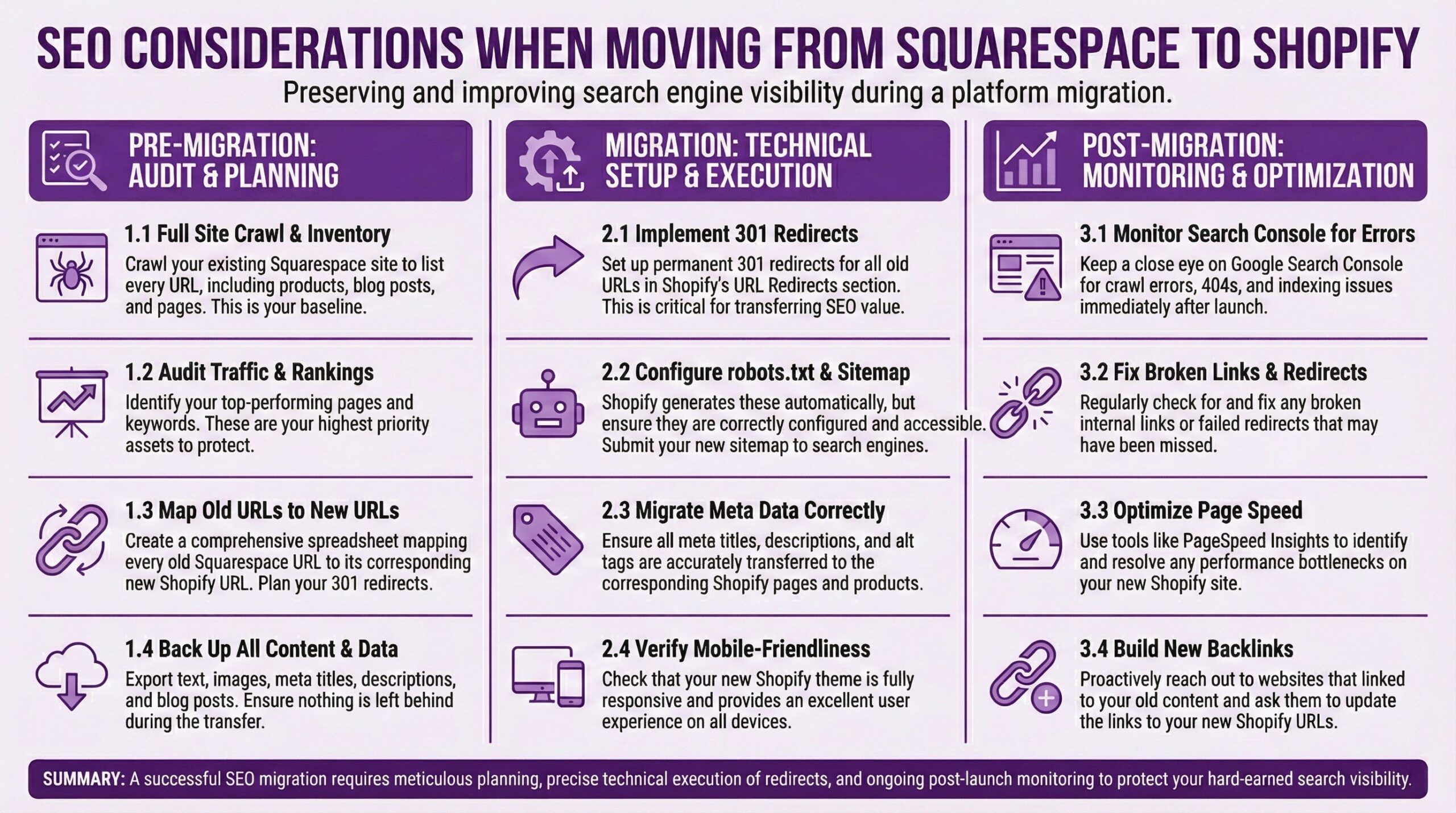
The SEO Piece of Replatforming You Can’t Skip
Gonna get slightly preachy here because rushing through a platform migration really can result in a fairly serious faceplant in an SEO sense of that word. You see. Your Squarespace URLs have been indexed by Google. They probably have authority and backlinks. When you move to Shopify, you get new URLs. If you don’t tell Google the old content now lives at a new address, Google thinks those pages disappeared. Here’s what I’m on about …
The core problem is URL structure. Your Squarespace store has URLs that Google has indexed. Those URLs have authority built up over time, maybe backlinks pointing to them from other sites, and established rankings for search terms that matter to your business. And because Google treats that as earned equity most attached to those specific URLs rather than to your brand generally, when you move to Shopify, everything gets new URLs with different structures, and different paths.
If you don’t explicitly tell search engines that your old content now lives at new addresses, Google treats those pages as deleted. Your rankings don’t transfer to the new URLs. They just… evaporate. I’ve seen merchants lose 40-60% of their organic traffic after poorly planned migrations. Recovery takes months.
The solution is 301 redirects, and you need to be thorough about them. A 301 redirect is a permanent forwarding instruction. It tells search engines and browsers that a page has permanently moved to a new location. The authority and ranking signals from the old URL transfer to the new one. Every important page on your Squarespace site needs a corresponding redirect. That means mapping your old product URLs to new product URLs, old collection pages to new collection pages, old blog posts to their new homes, and any static pages that have earned backlinks or traffic.
Here’s what the URL structures usually look like: Squarespace product URLs often follow patterns like /store/p/cool-product-name or /shop/killer-product-name. Shopify uses /products/product-handle. Collection pages shift from Squarespace’s /store/category-name to Shopify’s /collections/collection-handle. Blog posts move from /blog/post-title to /blogs/news/cool-post-title or whatever you name your Shopify blog.
In other words. You’ll need to map every old URL and redirect to it to its new equivalent before you flip the migration switch.
Shopify handles redirects through the URL Redirects feature in your admin under Online Store, then Navigation. You can add them one at a time for small sites or import a CSV file with your complete redirect mapping for larger catalogs. The CSV approach is faster but requires careful formatting.
Beyond redirects, there are a few other SEO considerations: Your meta titles and descriptions need attention. Squarespace stores them differently than Shopify, and they may not transfer cleanly through CSV migration. Audit your key product pages and collection pages after import to make sure your SEO metadata came through or rebuild it where needed.
Your sitemap changes. Shopify automatically generates a sitemap at yourdomain.com/sitemap.xml. Once your new store is live, submit this fresh sitemap to Google Search Console so Google knows to crawl your new URL structure.
Google Search Console itself needs updating. If you verified your site ownership through Squarespace’s built-in verification, you’ll need to re-verify ownership of your domain pointing to Shopify.
Image alt text sometimes gets lost in migration. If you’ve been diligent about descriptive alt text for product images on Squarespace, verify that data transferred. Product image SEO matters for Google Images traffic.
This is where migration apps or specialist help come in. Most automated migration tools include redirect mapping as part of their process. Agencies that specialize in ecommerce migrations have checklists and QA processes specifically for SEO preservation. The cost of professional help often pays for itself in organic traffic you don’t lose.
Timing Your Move From Squarespace to Shopify
Definitely Avoid peak sales periods. Don’t migrate during your busiest months. Black Friday through Christmas is terrible timing for most retailers.
Keep your Squarespace site live until Shopify is ready. Run both simultaneously. Only cut over when the new site is tested and ready for real customers.
Plan customer communication. Email customers before the transition explaining what’s happening. Email them again after go-live with password reset instructions. Don’t let them discover the change by trying to log in and failing.
Domain transfer takes time. DNS propagation can take up to 48 hours. Some shoppers might hit your old site while others see the new one during this window.
Will Getting Help From Shopify Experts Make Sense?
If your catalog exceeds a few hundred items, the margin for error in data migration grows. Variant mapping gets complex. The more products, the more valuable professional oversight becomes.
If SEO traffic represents significant revenue, the stakes on redirect setup become high. Missing redirects can take months to recover from in rankings.
If you’ve customized your Squarespace site with significant code, recreating that functionality in Shopify’s Liquid templating requires development expertise.
If you simply don’t have time, your time has value. Paying someone else to handle migration might be the more profitable choice.
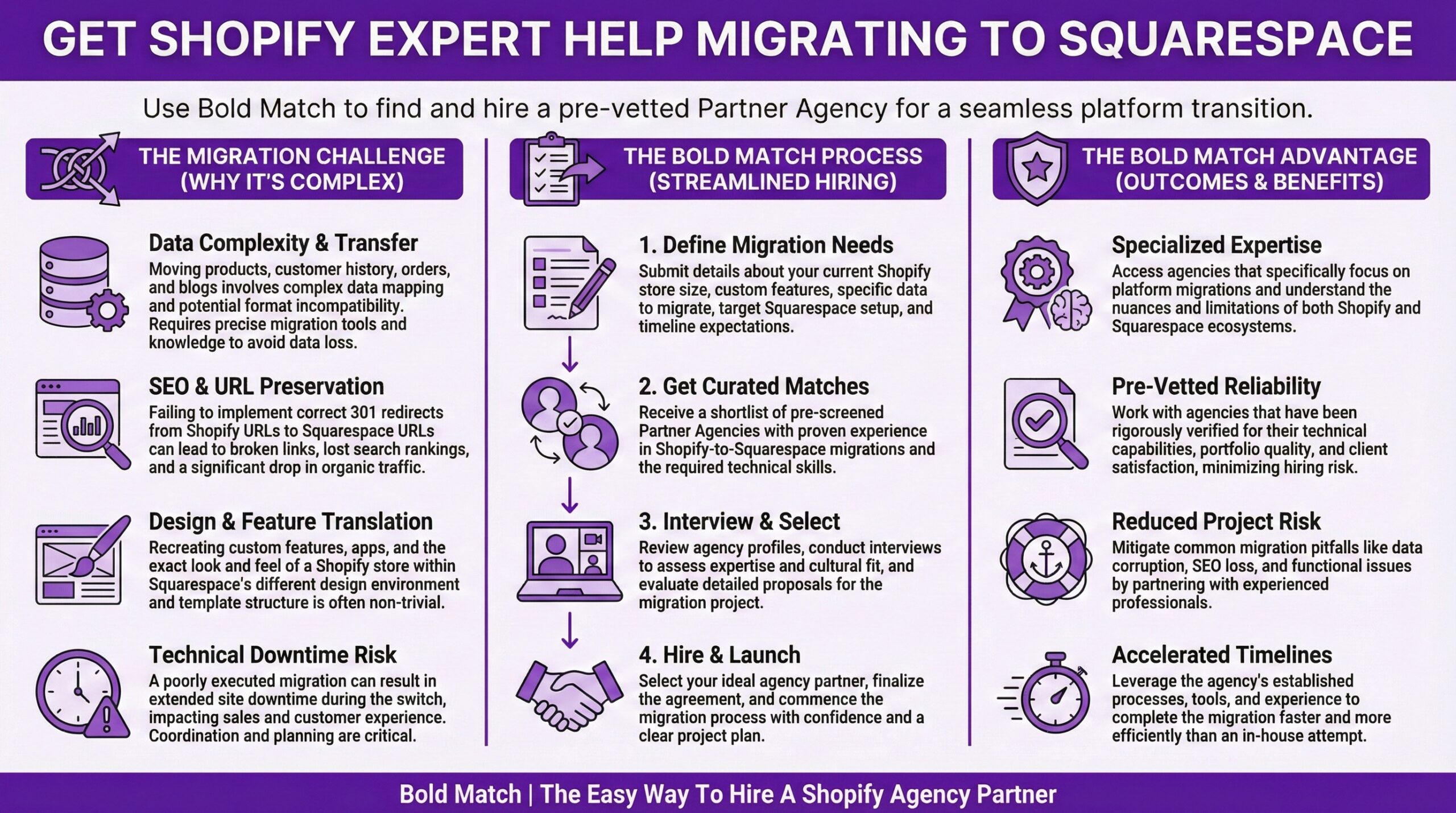
Bold Match offers free agency matchmaking to Shopify merchants and e-Commerce Retailers. We’ll connect you with vetted partners who handle exactly this work. No commissions, no fees. Moving from Squarespace to Shopify probably isn’t just about escaping one platform’s limitations. It’s probably just as much about better positioning your brand for where commerce is heading. Shopify’s continued investment in their platform, in their app ecosystem, and in social commerce integration means you’ll be moving to infrastructure designed for growth.
Replatforming might feel like a distinct project with an obvious beginning and a clear endpoint. But it isn’t exactly. What you’re really doing is laying the foundation for your retail business’s next phase. Do it carefully, plan properly, and the platform change will become a catalyst rather than a disruption. Ok. Alright. I’ve got a webhook firing twice for some reason and I need to suss out what’s triggering the duplicate events. The joys of asynchronous processing. Until next time. Get out there and make your tech stack work smarter, not harder! — Eric B
Frequently Asked Questions (FAQ)
How long does a Squarespace to Shopify migration usually take?Honestly. The timeline will vary based on the complexity of your current setup. I mean. A small store with under 100 products might migrate in a week including testing. Stores with thousands of products, complex variants, and significant Search Engine Optimization considerations can take four to eight weeks when done properly.
Will I lose my search engine rankings when I migrate to Shopify?
Maybe. But. Not if you handle redirects correctly. Setting up 301 redirects from every important Squarespace URL to its corresponding Shopify URL tells search engines content moved rather than disappeared. Skip redirects and you’ll see ranking drops that take months to recover from.
Can I keep my domain name when moving to Shopify?
Yes. Absolutely. Your domain is yours regardless of hosting. You can transfer it to Shopify or update DNS settings to point to your new store. Plan for up to 48 hours of propagation time.
Should I use a migration app or migrate manually?
Honestly. Depends on store size and spreadsheet comfort. Manual CSV migration works for small catalogs. Apps like Cart2Cart or LitExtension automate the process and handle redirects, making them worthwhile for larger stores. Costs range from $50 to several hundred dollars.
How much does professional migration assistance cost?
Freelance Expert and Partner Agency pricing usually ranges from $2,000 to $15,000 depending on scope. Basic migrations with template themes fall lower. Custom theme development, extensive SEO work, and app configuration cost more.
What can’t I bring from Squarespace to Shopify?
Your template design doesn’t transfer. Product reviews require manual import work. Blog content needs formatting cleanup. Customer passwords are lost. Custom code needs rebuilding in Shopify’s environment.