
What to Know Before Replatforming from OpenCart to Shopify
Written and edited by: Eric

Hey everyone, Eric Boisjoli here. Hope the post-turkey day recovery’s going smoothly and your return requests aren’t getting brutal 🦃.
So you’re thinking about leaving OpenCart for Shopify. I get it. If you’ve been running an OpenCart store for a few years, you’ve probably accumulated a list of frustrations that’s getting harder and harder to ignore. The PHP update dance. The extension that stopped working after the developer disappeared. That time your hosting provider upgraded something and your checkout broke for a weekend. OpenCart served its purpose. It’s open source, it’s flexible, and when you set it up four or five years ago it probably made sense for your budget and tech comfort level. Unfortunately things change. Your e-commerce brand grew. But the maintenance burden did the opposite of shrink.
Let’s walk through what you’ll actually need to know before making this move.
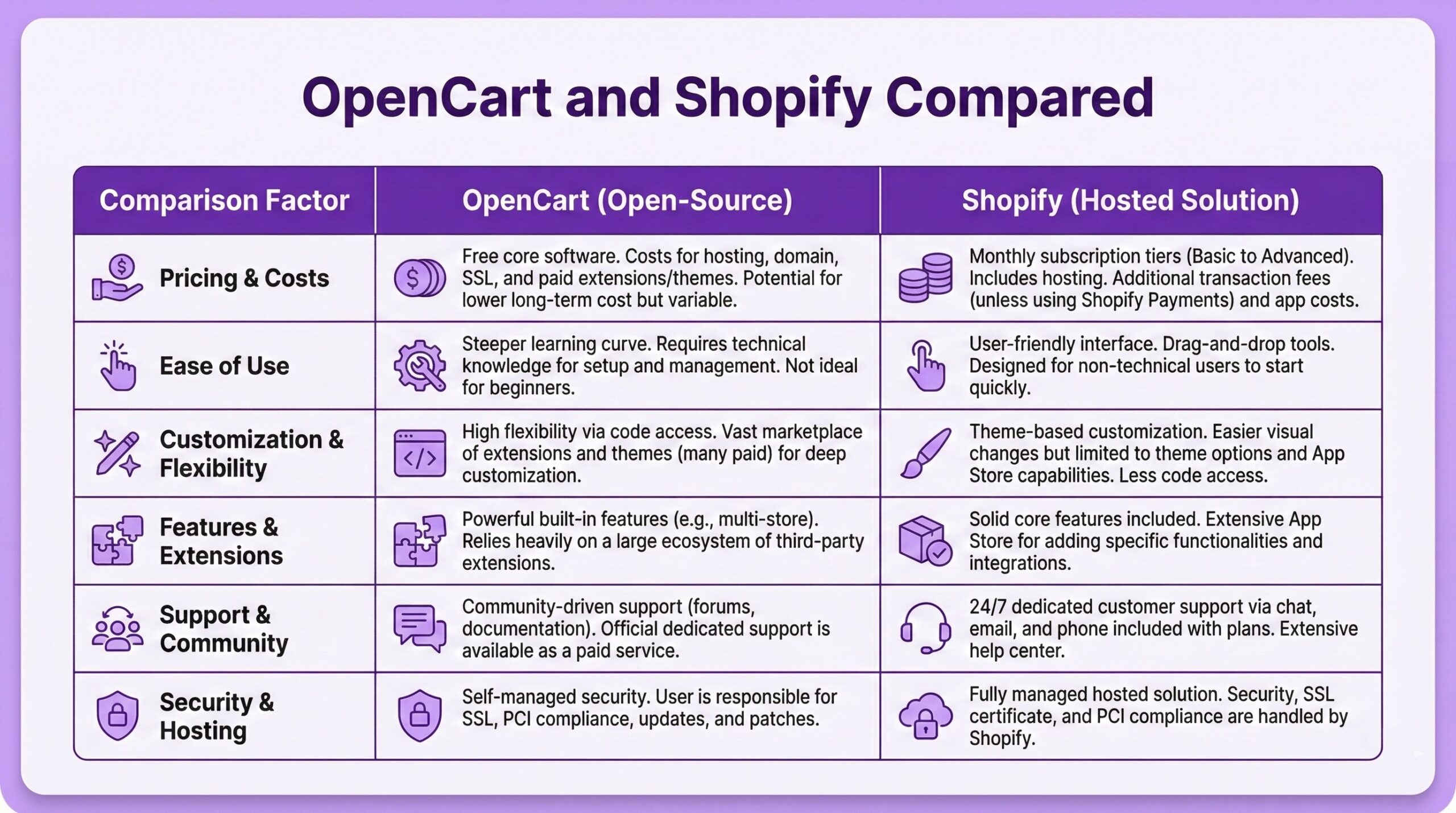
Why OpenCart Merchants Leave for Shopify
Before we get into how, let’s acknowledge why. Understanding your motivations will help you prioritize what matters most re migration.
The self-hosting burden is real. OpenCart is self-hosted, which sounds like freedom until you’re troubleshooting a server issue at 11pm on a Friday. You’re responsible for hosting, security patches, performance optimization, backups, and SSL certificates. When PHP gets updated, you get to figure out whether your store still works. When a vulnerability gets discovered, you’re the one who needs to patch it. Shopify handles all of that. Updates happen automatically. Security is their problem. Your hosting scales with your traffic without you touching a server configuration file.
The PHP version fragmentation is exhausting. OpenCart’s version history is, let’s call it “complex.” If you’re on OpenCart 3.0.3.x, you’re probably running PHP 7.3 or 7.4. If you want PHP 8 compatibility, you need to upgrade to 3.0.4.x or the maintenance branch. OpenCart 4.x requires PHP 8.0 or later but has had its own compatibility issues with extensions. The forums are full of threads from merchants trying to figure out which OpenCart version works with which PHP version and which extensions. It’s a lot of energy spent on infrastructure rather than selling products.
The extension ecosystem has quality issues. I’m not going to pretend Shopify’s App Store is perfect, but it’s miles ahead of OpenCart’s marketplace in terms of quality control, developer accountability, and ongoing maintenance. OpenCart’s marketplace has around 13,000 extensions, which sounds impressive until you start digging. Abandoned extensions that haven’t been updated in years. Developers who disappear after selling you something.
Extensions that conflict with each other in ways that require developer intervention to untangle. Extensions that modify core files and become impossible to remove cleanly. The OpenCart forums have entire threads dedicated to merchants stuck with extensions they can’t uninstall because the developer won’t respond and the code changes broke core functionality.
The platform is shrinking. According to Store Leads, OpenCart’s live store count decreased 14% year-over-year in Q3 2025. It’s not dying, but it’s not growing either. When a platform contracts, the ecosystem contracts with it. Fewer developers maintaining extensions. Fewer new features. Slower security response.

What OpenCart to Shopify Migration Actually Involves
The good news is that OpenCart to Shopify migrations are generally simpler than Magento migrations. OpenCart stores tend to be smaller, less customized, and more straightforward in their data structures. That said, you still need to plan properly.
The data that transfers cleanly: Products including names, descriptions, SKUs, prices, weights, inventory quantities, and images. If you’ve been maintaining clean product data, this should move over without major issues. Categories and their hierarchical structure. Your product organization should survive the move. Customer data including names, email addresses, billing and shipping addresses, and phone numbers. This is the foundation of your customer relationships and it transfers well. Order history including order numbers, dates, statuses, products purchased, quantities, and pricing. Historical data matters for customer service and business analysis.
Reviews if you have them. Customer feedback is valuable and worth preserving.
The data that needs attention: Customer passwords do not transfer. This is a platform limitation, not a migration tool problem. Your customers will need to reset their passwords on the new Shopify store. Plan to send a friendly email explaining the situation and providing a simple reset link. Most customers understand platform changes happen. Custom fields and attributes may need mapping to Shopify’s metafields. If you’ve built out custom product specifications in OpenCart, you’ll need to figure out where that data lives in Shopify’s structure. SEO URLs need 301 redirects. OpenCart and Shopify use different URL structures. If you don’t set up proper redirects, you’ll lose the SEO equity you’ve built over years. More on this below.
What doesn’t transfer at all: Your theme and design. OpenCart themes don’t translate to Shopify. You’ll pick a new theme from Shopify’s library and customize it to match your brand. Think of this as an opportunity rather than a loss. Your OpenCart theme was probably due for a refresh anyway. Extensions and their functionality. Every extension you rely on in OpenCart needs a Shopify equivalent. Some will have direct replacements in the Shopify App Store. Others might be handled by native Shopify features. A few might require custom development or a rethinking of your workflow.
How Migrating to Shopify Will Actually Work
You have a few options for moving your data, ranging from doing it yourself to hiring expert specialists or a partner agency.
Manual CSV export and import. OpenCart lets you export data to CSV files, and Shopify has import tools that accept CSV files. This is the most labor-intensive option but costs nothing beyond your time. It works reasonably well for smaller stores with straightforward product catalogs. If you have a few hundred products and not much customization, this might be all you need. The catch is that you’ll need to reformat your CSVs to match Shopify’s expected structure. Column names differ. Data formats differ. It’s not plug-and-play.
Automated migration tools. Services like LitExtension, Cart2Cart, and Next-Cart specialize in platform migrations. You connect both stores, select what you want to migrate, and the tool handles the data transfer. Pricing usually depends on the number of entities being migrated. A store with 500 products, 2,000 customers, and 5,000 orders will cost more than a store with 100 products and 300 customers. Expect to pay somewhere between $80 and a few hundred dollars depending on your store size and the options you select. These tools work well for the standard migration scope. Products, customers, orders, categories, reviews. If you have unusual customizations or complex data relationships, you may hit edge cases that require manual cleanup.
Partner Agency or expert developer assistance. If your store has significant complexity, custom integrations, or if you simply don’t want to deal with the technical details, hiring a Shopify specialist makes sense. This is the most expensive option but also the most hands-off. An experienced agency will handle the data migration, set up your new theme, configure your apps, implement redirects, and test everything before launch. They’ll also catch issues that automated tools might miss.

The SEO Preservation Checklist
This is where most OpenCart to Shopify migrations (and most replatforms period) foul out. Mess up your SEO transition and you can lose months of search rankings.
Export your current URLs before you touch anything. Make a complete list of every product URL, category URL, and content page URL on your OpenCart store. You’ll need this for redirect mapping.
Understand the URL structure difference. OpenCart URLs might look like yourstore.com/product/cool-skateboard-deck. Shopify URLs look like yourstore.com/products/cool-skateboard-deck. The structure is similar but not identical. Every old URL needs to point to its new equivalent.
Set up 301 redirects for everything. A 301 redirect tells search engines that content has permanently moved to a new location. This transfers most of your link equity to the new URLs. Shopify lets you set up redirects directly in the admin under Online Store, then Navigation, then URL Redirects.
If you have hundreds of products, you’ll want to use Shopify’s bulk redirect import rather than entering them one by one.
Preserve your meta titles and descriptions. These should transfer during the data migration, but verify them after. Check your top-performing pages in particular.
Submit your new sitemap to Google Search Console. Once your Shopify store is live, generate a new sitemap and submit it. This helps search engines discover your new URL structure faster.
Expect a dip, then recovery. Even with perfect redirect implementation, you’ll likely see some ranking fluctuation in the weeks after migration. This is normal. If your redirects are correct and your content is intact, rankings usually stabilize within a month or two.
Migration Timeline and Planning
OpenCart to Shopify migrations for smaller stores usually take one to four weeks of actual work, depending on complexity. Larger stores with thousands of products and custom functionality might take longer.
Here’s a rough framework:
Week one: Audit and preparation. Export all your data from OpenCart. Create a full backup. Inventory your extensions and identify Shopify equivalents. Sign up for Shopify and choose your plan.
Week two: Theme and configuration. Select and customize your Shopify theme. Set up your payment gateways, shipping rules, and tax configuration. Install essential apps.
Week three: Data migration and testing. Run your migration. Verify that products, customers, and orders transferred correctly. Check for formatting issues, missing images, or broken data relationships.
Week four: Final testing and launch. Set up redirects. Test checkout with real transactions. Verify email notifications work. Do a final delta migration to capture any orders or customers added since your initial migration. Remove password protection and go live.
For very simple stores, you might compress this into two weeks. For complex stores, budget more time for testing and troubleshooting.
What About Shopify vs Shopify Plus?
Most merchants migrating from OpenCart will be fine on standard Shopify plans. OpenCart stores tend to be small to mid-sized operations, and Shopify’s Advanced plan handles most needs. The reasons you’d consider Shopify Plus include high transaction volumes where the reduced transaction fees pay for themselves, B2B wholesale requirements with company accounts and custom price lists, advanced checkout customization needs, or multi-store management at scale.
If you’re doing under $1M annually and running a straightforward D2C operation, standard Shopify is probably right. If you’re significantly above that threshold or have complex requirements, the economics and features of Plus start making sense. O’ and I did this whole other piece on when to upgrade to Shopify Plus about a month ago, if that decision is relevant to your specific situation.
Common Migration Mistakes to Avoid
Rushing the redirect setup. This is the most common mistake. Merchants get excited about their shiny new Shopify store and go live without proper redirects. Then they wonder why their organic traffic dropped 60%.
Forgetting about email marketing integrations. If you were using Mailchimp, Klaviyo, or another email platform with your OpenCart store, you’ll need to reconnect it to Shopify. Don’t launch without testing that your email flows still work.
Not testing checkout thoroughly. Place test orders. Use different payment methods. Test on mobile. Make sure tax calculation is correct. Make sure shipping rates display properly. Small checkout problems become big revenue problems.
Underestimating the theme customization time. Picking a Shopify theme takes an hour. Customizing it to match your brand, uploading your logo, configuring your navigation, setting up your homepage, and making it feel like your store takes considerably longer.
Skipping the customer communication. Let your customers know about the migration. A simple email explaining that you’ve upgraded your store, that they’ll need to reset their passwords, and that the shopping experience is now better goes a long way.
What Shopify Does Better (And What You Might Miss)
What you’ll gain: Automatic updates and security. You never think about PHP versions again. A checkout that actually converts. Shopify’s checkout is optimized based on billions of transactions. Shop Pay alone can lift conversion by up to 50% compared to guest checkout. A massive app ecosystem with quality control. Thousands of apps, most of which work reliably because Shopify enforces standards. 24/7 support from people who know the platform. OpenCart support forums are volunteer-driven. Shopify has paid professionals available around the clock. Integrations with everything. Accounting software, email marketing, inventory management, shipping carriers, social selling. The connectors already exist.
What you might miss: Full server access for edge-case customization. Shopify is a closed ecosystem. You can’t modify core platform code. For 95% of merchants this doesn’t matter. For the 5% who need unusual customizations, it can feel limiting.
One-time licensing cost. OpenCart is free. Shopify is subscription-based. You’re trading upfront cost for ongoing monthly expense. Most merchants find the trade-off worthwhile when they factor in hosting, security, maintenance, and developer costs they were paying anyway. Certain extension flexibility. Some OpenCart extensions did things that Shopify apps don’t replicate exactly. Usually there’s a Shopify equivalent that’s close enough, but occasionally you’ll need to adapt your workflow.

When an Expert Partner Agency Makes Sense
Look, I’m openly biased here because Bold Match literally exists to connect merchants with agencies. But genuinely, OpenCart to Shopify migrations are often simple enough that many store owners can handle them without the help of an expert. You probably don’t need a partner agency if you have a fairly small catalog under a few hundred products, your OpenCart store was pretty vanilla without heavy customization, you’re comfortable with technical work and have time to manage the migration yourself, and your budget is a little tight.
You probably do need agency specialists if you have thousands of products with complex variant structures, you’re running significant customizations or integrations that need to be rebuilt, SEO is critical to your retail vertical’s niche and you can’t afford to get redirects wrong, you don’t have time to manage the migration while running your business, or you want someone else to be accountable if or when something serious breaks.
If you’re in the second category and want help finding the right Shopify Partner Agency, that’s exactly what Bold Match does. We connect merchants with vetted agencies based on your specific project needs. Free, no commissions, no pressure! No, really. Free! Alright, that’s the overview. The outdoor concrete at the Forks is definitely frozen solid by now, but I heard the ramps at The Edge got resurfaced recently so there’s always a good indoor option. Stay warm. And be sure to make sure your tech stacks works smarter, not harder! – Eric B.
Frequently Asked Questions (FAQ)
How long does it take to migrate from OpenCart to Shopify?For small to medium-sized e-commerce stores (i.e. retailers with under 1,000 products), expect two to four weeks from planning to launch. Simple stores with a few hundred products might complete migration in under two weeks. Larger or more complex stores can take six to eight weeks, especially if you have custom integrations that need rebuilding or extensive SEO work.
Will I lose my search engine rankings when I migrate?
Yes. Or rather … You’ll likely see some temporary fluctuation, but proper 301 redirects preserve most of your SEO equity. The key is mapping every old OpenCart URL to its new Shopify equivalent before you go live. Merchants who skip or rush the redirect setup do lose rankings. Those who handle it correctly usually recover within four to eight weeks.
Can I migrate customer passwords from OpenCart to Shopify?
No. No you cannot. Customer passwords cannot be transferred between platforms due to how password hashing works. After migration, you’ll need to ask customers to reset their passwords. Some migration tools offer a “password migration” option that uses a Shopify app to handle this more gracefully, but customers will still need to take action.
How much will an OpenCart to Shopify migration cost me?
That depends. DIY migration using manual CSV export and import costs nothing but your time. Automated migration tools like LitExtension or Cart2Cart range from $80 to $300+ depending on store size and options selected. Hiring a freelance expert or a partner agency for full-service migration typically starts around $1,500 and can go significantly higher for complex stores.
What happens to my OpenCart extensions when I migrate?
Unfortunately. Extensions do not transfer. You’ll need to find Shopify App Store equivalents for each function you relied on. Most common extensions have Shopify alternatives. Some functionality that required extensions in OpenCart is built into Shopify natively. Occasionally you’ll need custom development to replicate unusual workflows.
Should I upgrade to the latest OpenCart version before migrating?
Usually no. Migration tools work with various OpenCart versions, and upgrading OpenCart right before leaving it creates unnecessary risk. Spend your energy on the Shopify setup instead. The main exception is if your current OpenCart version is so old that migration tools don’t support it.
Do I need Shopify Plus for my migration?
Probably not. I mean. Most OpenCart merchants do not need Shopify Plus. Standard Shopify plans handle the needs of small to mid-sized stores well. Plus makes sense for stores doing over $1M annually with high transaction volumes, complex B2B requirements, or multi-store operations. If you’re unsure, start with standard Shopify and upgrade later if needed.
Can I run both online stores simultaneously during migration?
Yes. Yes you can and yes you probably should. Keep your OpenCart store live and continue taking orders while you build out your Shopify store in the background. Shopify stores are password-protected by default until you’re ready to launch. Run a final “delta migration” to capture recent orders and customers right before switching over.